About this app
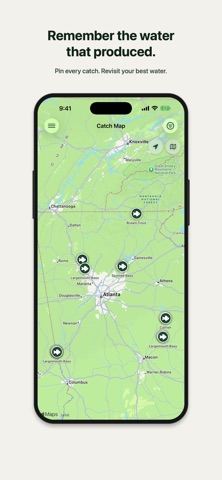
Make every day on the water part of your fishing story. Fish Wizard is a private, local-first fishing log for recording trips, catches, photos, and the details you want to remember. There is no account to create. Your log stays on your device by default, with optional iCloud sync available through your private iCloud account. LOG YOUR TRIPS Record the body of water, date and time, fishing style, target species, duration, notes, and catches from each outing. TRACK EVERY CATCH Save species and subspecies, length, weight, catch time, notes, photos, and the trip where it happened. Search and filter your log whenever you want to revisit a day on the water. LOG LOCATIONS AND CONDITIONS Pin a catch on the map and Fish Wizard fills in the conditions for that spot and time — air temperature, weather, water temperature when available, humidity, barometric pressure, and moon phase — so you can spot the patterns behind your best days. See conditions for each trip too. Location is optional, off by default, and controlled by a single opt-in you can turn off anytime. REVIEW PHOTOS WITH SMART IMPORT Fish Wizard can scan photos on your device to suggest likely fish pictures and group them by capture time. Every suggestion is review-first: nothing becomes a catch or trip until you confirm it. SEE YOUR FISHING STORY IN NUMBERS Explore trip and catch totals, averages, personal bests, species breakdowns, vessel stats, and more. KEEP BUILDING MOMENTUM Earn XP and unlock achievements as you log trips, catches, measurements, notes, and photos. SYNC ON YOUR TERMS Keep your log on-device by default, or turn on optional iCloud sync in Settings to keep your fishing history up to date across your devices through your private iCloud account. SHARE THE HIGHLIGHTS Create polished images for catches, trips, stats, and achievement progress, then share them through the standard iOS share sheet. BACK UP ON YOUR TERMS Export your log as a JSON backup and import it later. You can also delete your saved user data from Settings, with clear warnings when iCloud Sync is enabled. Fish Wizard includes no ads, analytics SDKs, account login, or third-party tracking.
Latest release
What’s New
- The Home screen is redesigned around what's happening right now — tap to start a live fishing session, and see your angler level, lifetime catches, and progress at a glance - Trip Details now walks through your day as a timeline, from start to each catch to finish — tap any catch to jump straight to it - Every trip gathers the weather and water readings from your whole time on the water into one conditions summary, so you can see how things shifted between the first cast and the last - Catch Details got a fresh card layout, and now shows the trip it belongs to plus where the sun was — sunrise, sunset, and how long before or after you landed the fish - Catch Map now points you to boat ramps, marinas, and bait & tackle shops nearby, with campgrounds, parks, and fishing piers a tap away in Filters — open any of them in Maps for directions - Focus your stats on the last 30 or 90 days, the last year, or any calendar year, and every highlight, chart, average, and personal best follows along - Your shareable Fisher Stats card is rebuilt — catch highlights, trip stats, and fishing style grouped into sections, in a light or dark look
Audience growth
Ratings growth
Baseline captured. Growth appears after the crawler observes a changed rating count.
Momentum comes from crawler snapshots for the tracked storefront. “Viral growth signal” means unusually fast recent rating gains; it is an indicator, not download data.
Price tracking
Price intelligence
First snapshot captured. The trend line starts after the next crawler price observation.
- First observed Aug 19, 2026 · 9:37 AM Free
Screenshots