About this app
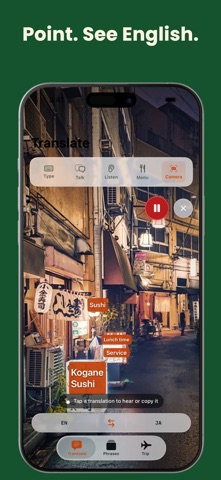
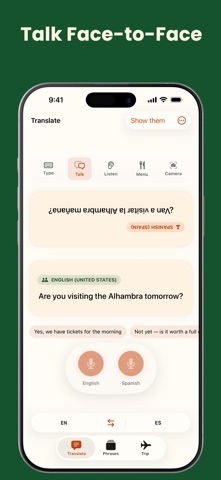
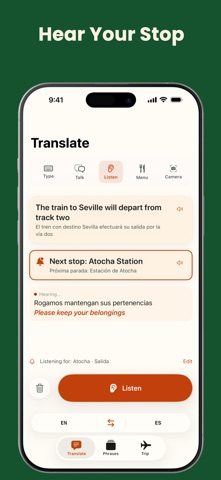
Talk to anyone. Read any menu. Be understood — even offline. Flunqero is your pocket interpreter. Three tabs — Translate, Phrases, Trip — built for the moments travel actually throws at you. "I can't read the menu." • Menu: photograph a menu — every page — and read it in your language, with sections, dishes and prices lined up. Tap a dish to see what it actually is. • Camera: point at signs, labels and screens and see the translation right on the words. "I need the kitchen to take my allergy seriously." • Allergy card: a full-screen card about your allergies and diet, in the kitchen's language — with warnings about hidden ingredients, and Yes/No buttons so staff can answer you. Show it on screen or print it as a PDF. Your first language is free, always. "I need to talk to this person." • Type: write anything, then show it big or say it out loud. • Talk: a real two-way conversation. Flunqero works out which language was just spoken and answers in the other one — hand your phone over and they reply with a tap. • Listen: live captions for announcements and fast talkers. Add your stop or your hotel to the watch list, keep Listen open, and your phone buzzes when it's said. "I need help, now." • Emergency cards: big, ready-to-show phrases for getting help fast. Always free, and offline once you've downloaded the language. "I want to be ready before I land." • Pick your destination and Flunqero sets your language and currency, then downloads the language so translation works with no signal. • How much is that? Check a price in your own money — works offline. • Know before you go (Pro): etiquette, tipping and market know-how for your destination, saved offline before you fly — plus a tip calculator for the bill in front of you. • Ask anything (Pro): "How do I order politely?" "Is tap water safe?" — answered right on your device. "I want to keep the phrases that worked." • Save phrases, sort them into folders, look up any word, and practise with per-word feedback and daily review. • iCloud keeps your saved phrases in sync across iPhone and iPad. ON YOUR WRIST • Apple Watch: your allergy card and your latest saved phrases, plus ready-made phrases for your destination from a 14-language catalogue — there even when your phone isn't. • Add the Flunqero complication to a watch face for a travel phrase at a glance. WHAT'S FREE Type, Talk, Listen, Menu and Camera translation. Emergency cards. Your first allergy-card language. Offline language packs. The price checker. Pronunciation practice and review. Up to 30 saved phrases. FLUNQERO PRO Ask anything, Know before you go, allergy cards in 16 languages, unlimited saved phrases, unlimited dish briefings and natural premium voices. Start with a 7-day free trial, or pay once for Lifetime. A 30-day Trip Pass is offered if you've already used your trial. NEEDS APPLE INTELLIGENCE Ask anything, Know before you go, the tip calculator, dish briefings, and Talk's reply suggestions and tone rewriting run on Apple Intelligence, so they need an iPhone 15 Pro or newer with Apple Intelligence turned on. Translation, speech, menus, camera, the allergy and emergency cards and everything else work on any iPhone that runs the app. PRIVATE BY DESIGN Translation, speech and AI answers run on your device. Your phrases sync through your own iCloud. No account. No tracking. Privacy Policy: https://fierce-inlet-63133.herokuapp.com/flunqero-privacy Terms of Use (EULA): https://www.apple.com/legal/internet-services/itunes/dev/stdeula/
Latest release
What’s New
EASIER TO READ We went back over the app and strengthened the faint text. Labels, hints and warnings are clearer now, and hold up better in sunlight. YOUR ALLERGY CARD, FASTER Once you've built your card, tapping "Allergy card" takes you straight to it — no form in the way. (Haven't made one yet? You'll fill in the short form once.) The allergens are much bigger, so staff can read them at a glance. To check the card in your own language — or change what's on it — tap "What this says". MORE ROOM TO TRANSLATE The Translate screen gives you back a lot of space, your translation is bigger, and "Show them" is now a big button right under your thumb. Flunqero also remembers whether you were typing, talking, listening or reading a menu, and opens there next time. Camera always starts closed. MENUS IN YOUR LANGUAGE FIRST Scanned menus now lead with your language, with the original underneath so you can still point at the dish. If a line can't be translated, the dish name stays on top — tap it to try again. TALKING WITH PEOPLE Talk names languages simply ("Spanish" rather than "SPANISH (SPAIN)"), tells you when the microphone is still getting ready, and its opening message is now the right way up. BEFORE YOU LOSE SIGNAL Tap the language pill and you'll see which languages still need downloading. And "Get ready for this trip" now downloads your trip's language both ways — so once it's done, you can translate to it and from it with no signal. BETTER ON IPAD Bigger type on the allergy card and in Talk, easier-to-read "Know before you go" guides, and Phrases opens on the phrase categories instead of an empty list. The extra sidebar button is gone — the tabs do the same job. A FEW SMALLER THINGS Showing a card turns your screen brightness up, and now hands it straight back the moment you switch away from the app. Thank you for travelling with Flunqero. Safe trip.
Audience growth
Ratings growth
Baseline captured. Growth appears after the crawler observes a changed rating count.
Momentum comes from crawler snapshots for the tracked storefront. “Viral growth signal” means unusually fast recent rating gains; it is an indicator, not download data.
Price tracking
Price intelligence
First snapshot captured. The trend line starts after the next crawler price observation.
- First observed Aug 7, 2026 · 6:38 AM Free
Screenshots