About this app
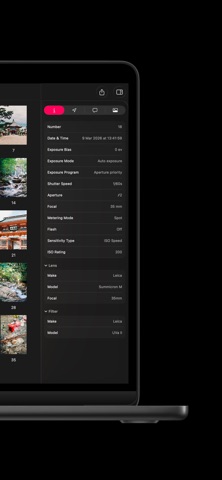
Frames is a film photography logbook that connects every shot to its final scan. Record your frames as you shoot, then embed your shooting data into scanned images as EXIF once your negatives are developed. • Manage film rolls, cameras, lenses, and filters in one place • Log every frame: aperture, shutter speed, exposure compensation, metering, ISO, location, and more • Controls that adapt to your camera and lens setup • Autofill film stock, camera, lens, and ISO for faster logging • Attach reference images for visual context per frame • Organize with folders and search • View shoots on an interactive map and revisit locations • Sync across iPhone and iPad with iCloud • Export to Frames, PDF (print-ready), CSV, TXT, GPX, and XMP • Includes 200+ film stocks: Kodak, Fujifilm, Ilford, CineStill, Lomography, and more • Supports 35mm, 120 medium format, and large format cameras • Privacy-focused: no ads, no tracking, no account required Embed Your Metadata with the Frames Mac App After developing and scanning your negatives, the Frames Mac app writes your shooting data directly into image files as EXIF metadata. Compatible with JPEG, JXL, TIFF, and DNG files from any scanner. Every scan then carries the full context of how it was shot: camera, lens, film stock, shutter speed, aperture, flash, focus distance, exposure program, metering mode, location, and more. Adobe Lightroom, Apple Photos, and any EXIF-aware software read your film settings the same way they read a digital camera’s. No spreadsheets. No scattered notes. One consistent record attached to every image. Includes up to 5 film rolls for free. Upgrade for unlimited rolls, subfolders, data export, and metadata embedding with the Frames Mac app. Terms of use: https://www.apple.com/legal/internet-services/itunes/dev/stdeula/
Latest release
What’s New
Frames now show the time they were taken, in their original time zone.
Audience growth
Ratings growth
Baseline captured. Growth appears after the crawler observes a changed rating count.
Momentum comes from crawler snapshots for the tracked storefront. “Viral growth signal” means unusually fast recent rating gains; it is an indicator, not download data.
Price tracking
Price intelligence
First snapshot captured. The trend line starts after the next crawler price observation.
- First observed Aug 12, 2026 · 5:27 PM Free
Screenshots