About this app
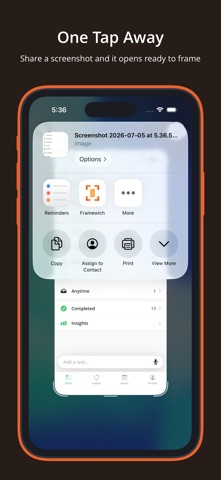
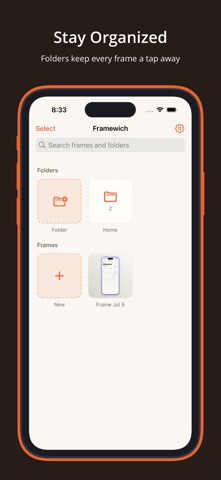
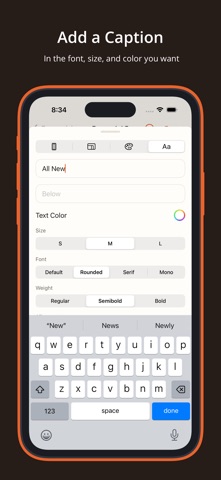
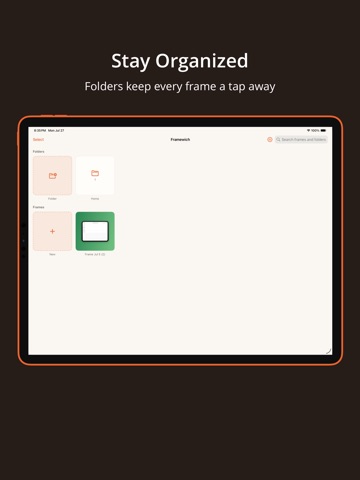
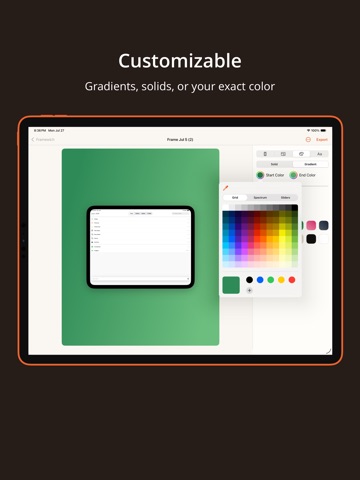
Framewich turns a plain screenshot into something worth sharing. You can drop any screenshot into a realistic device frame, set it against a background you actually like, and export a polished image in seconds, all without leaving your phone or opening a complicated design tool. Whether you are showing off your own app, putting together a quick tutorial, sharing a conversation, or building marketing images for the App Store, Framewich gives you a clean and genuinely fast way to make your screenshots look intentional. Import in a Tap You can send a screenshot straight from the share sheet the moment you capture it, or open the app and pick any image from your camera roll. Framewich reads the dimensions of your screenshot and chooses a matching device frame for you, so you are ready to start styling right away. Realistic Device Frames Wrap your screenshot in an iPhone or iPad frame that actually fits the shot, from the newest edge to edge models with the pill cutout all the way back to the classic home button look. You can pick a finish that suits the mood, add a soft or a stronger shadow for a sense of depth, and let the frame carry the whole image. Backgrounds That Fit Set any background color you want with a full color picker, pull a shade directly from your screen, or reach for one of the curated presets and warm gradients when you would rather move quickly. Everything updates live while you work, so you can settle on the right look without any guesswork. Sizes for Every Platform Resize your canvas to whatever ratio you need, whether that is a square for a feed post, a tall format for a story, or a wide format for a slide or a website. Your framed screenshot stays centered and stays sharp at every single size. Captions and Text You can add a line of text above or below your screenshot whenever a shot needs a little context. Choose the font style, the weight, and the color that match your message, and keep the whole thing clean and easy to read. Stay Organized Name the images you create, group them into folders, and search back through everything you have made. Your work is always waiting for you, so coming back to tweak an old project or spin up a variation takes only a moment. Export Anywhere When you are happy with the result, export a high resolution image and send it wherever you like, from your camera roll to a message, a social post, or a design tool. Your images stay on your device the entire time. Light and Dark Framewich looks right in whichever appearance you prefer, and you can move between system, light, and dark whenever the mood strikes. Built to Stay Simple There are no ads, no clutter, and nothing standing between you and a great looking screenshot. You just open it, frame it, and share it. Start making your screenshots look their best, and download Framewich today. Privacy Policy: https://www.lzctrl.com/policies/framewich-privacy-policy Terms of Use (Apple Standard EULA): https://www.apple.com/legal/internet-services/itunes/dev/stdeula Additional Terms of Use: https://www.lzctrl.com/policies/framewich-terms-of-use
Latest release
What’s New
Framewich 1.2.0 — A Home for Every Set This release is all about organizing and managing your screenshots at scale. Nest folders by app and version, drop in a whole batch of screenshots at once, drag them into the perfect order, and move or delete a selection in one go. WHAT'S NEW Folders Within Folders • Nest folders to keep things tidy — an app on top, then a folder per version or day inside • Go up to five levels deep • "Apply to all" still only touches the frames in that one folder, never what's nested inside Import a Whole Batch at Once • Pick as many screenshots as you like from Photos and they all come in together • Each lands in the folder you're currently in, with its device auto-detected Put Your Set in Order • Press and drag any frame to reorder it • Line your screenshots up in the exact sequence the App Store will show them Do More with a Selection • Swipe across frames to select a whole range in one motion • Move or delete many frames at once — not just export • Move a selection into a folder, or back out to your library Dial In Your Corners • A new corner-radius control rounds (or squares) the device to taste • Reads "Default" at the device's natural radius, with a one-tap reset to get back IMPROVEMENTS & POLISH • Match Colors now pulls the bolder, more vivid colors out of your shot instead of dull grays • "Apply to all" now carries the device frame across the whole set, not just the finish and background • A cleaner drag preview when reordering, plus small stability improvements throughout Thanks for using Framewich, and for all the feedback shaping where it's headed. If it's saving you time, a review genuinely helps!
Audience growth
Ratings growth
Baseline captured. Growth appears after the crawler observes a changed rating count.
Momentum comes from crawler snapshots for the tracked storefront. “Viral growth signal” means unusually fast recent rating gains; it is an indicator, not download data.
Price tracking
Price intelligence
First snapshot captured. The trend line starts after the next crawler price observation.
- First observed Aug 20, 2026 · 2:24 PM Free
Screenshots