About this app
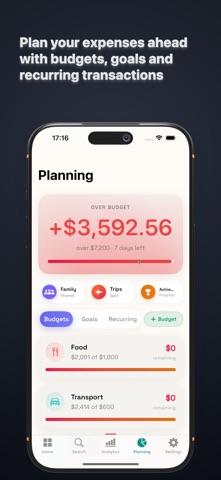
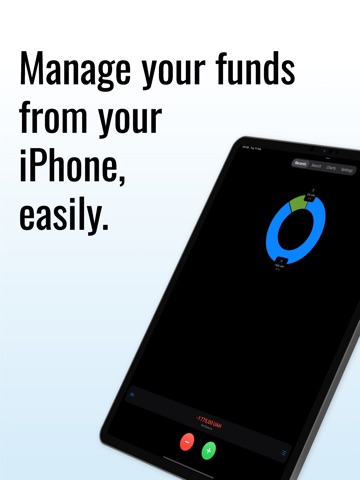
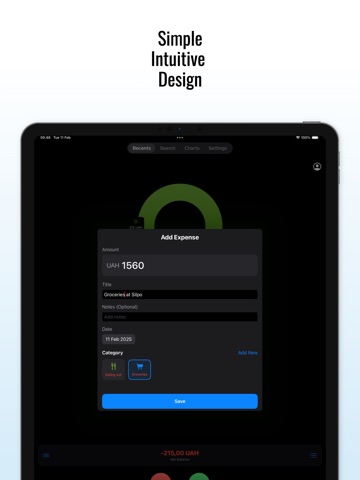
Fundeer is an offline-first money app for tracking spending, splitting trips, and running shared family budgets. No account required, and your data lives on your device first. Log money three ways Type it, say it, or snap it. Say "coffee, 45" and it's in. Point your camera at a receipt and Fundeer reads the merchant, the items, and the total. The things you log most stay one tap away on quick-add buttons and shortcuts. Split trips without the spreadsheet Start a trip, invite the people on it, and everyone logs as they go. At the end, one screen shows who owes whom, simplified down to the fewest payments. Equal splits, exact amounts, shares, or percentages, in as many currencies as your trip needs. Trip Mode Flip one switch when your trip starts and everything you spend — typed, scanned, spoken, or imported from your bank — attaches to that trip automatically. Each trip gets its own report: total spent, daily spending, and where the money went. Shared family budgets Share a budget with your family and track everyone's contributions and shared expenses in one place, with roles and permissions per member. Balances update live for everyone in the group. Bring your history with you Import a statement from your bank as OFX, QFX, QIF, or CSV, and map the columns yourself if the format is one we haven't seen. Existing backups from Money Manager, Monefy, Dime, and Quicken come across too. Catch up on what changed One Activity screen gathers what happened across your trips and shared budgets: new expenses, settlements, invitations, budget warnings, and role changes. Tap a notification and it opens the exact expense, budget, or settlement it was about. Analytics that earn their space Three views, one tab. Overview scores your month on savings rate, budget control, consistency, income flow, and balance. Breakdown shows every category and every day. Forecast projects how the month ends from your own habits. Rearrange the cards so your dashboard shows what you actually care about. FIRE planning Set your target number and retirement age, then watch your projected path to financial independence. Budgets and savings goals Set a monthly limit per category and see how much room is left. Create savings goals with deadlines and watch the progress add up. Offline-first, synced across devices Everything saves locally and is there instantly. When you're online, your changes sync across devices, and shared trips and family budgets stay in sync for everyone. Private by default Lock the app with Face ID, Touch ID, or your device passcode. The screen blurs the moment you switch away. Analytics and crash reporting are opt-in, and turning them off actually turns them off. Also included - Bank import for Monobank (Ukraine); more banks planned - Log Apple Pay purchases with a one-tap Shortcut - Multi-currency: USD, EUR, GBP, UAH, PLN, and more - Available in English and Ukrainian - Recurring transactions - Custom categories with your own icons and colors - Export to CSV, JSON, or PDF - Home Screen, Lock Screen, and Control Center widgets - Streaks, levels, and achievements - Dark mode
Latest release
What’s New
Import a statement from a bank Fundeer has never seen. You can open OFX, QFX and QIF files, and map the columns of any bank's CSV yourself, so a statement becomes transactions with the amount, date and category you expect. Notifications name what arrived. A card payment, a shared expense or a settlement says what it was in the notification itself, and opens exactly that when you tap it. Activity gathers what changed since you last looked and names each item, so the count on a tab is something you can read at a glance. Shared trips and family budgets stay consistent across every device, with one figure for every balance, and every total, settlement and export quoted in the trip's own currency. A shared expense records who paid and how the bill was divided, and archived trips and budgets stay where you expect to find them. Your categories reach every device you sign in to, so your whole history stays organised wherever you open it. Export without a connection. Fundeer writes your transactions to CSV or JSON on the device itself, so a spreadsheet is one tap away whether or not you are online. A scan tells you where it landed. When a receipt is not dated today, Fundeer says so before saving and names the day in the confirmation, and Input History opens the transaction a scan or a voice note created. Every text size is honoured, so the app stays readable at the size you set in iOS. A budget past its limit says how far past. A category that has run out names the amount you are over, so the figure on the card explains the one at the top of the screen. Haptics answer your touch and nothing else, and Settings has a switch to turn them off entirely. Every trip, family group and reward opens the same way, from the same place, with the same movement. Layout and animation polish throughout.
Audience growth
Ratings growth
Baseline captured. Growth appears after the crawler observes a changed rating count.
Momentum comes from crawler snapshots for the tracked storefront. “Viral growth signal” means unusually fast recent rating gains; it is an indicator, not download data.
Price tracking
Price intelligence
First snapshot captured. The trend line starts after the next crawler price observation.
- First observed Sep 5, 2026 · 3:28 PM Free
Screenshots