About this app
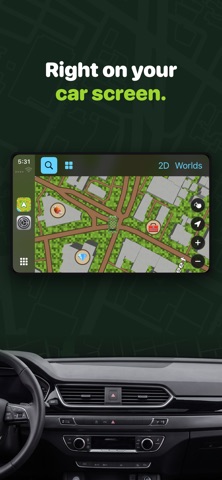
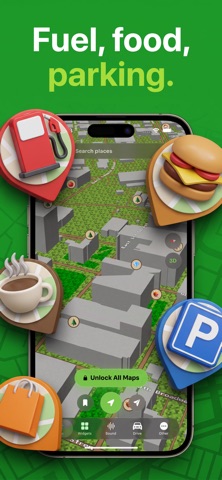
Game Maps: Your Car Screen, Reimagined Through Iconic Game Maps Turn every drive into an adventure. Game Maps transforms your phone into a full in-car display — and reimagines the world around you in the style of your favorite classic game maps. No extra hardware required: just dock your phone on the dash and drive. The smart Driving Mode gives you a native-feeling dashboard right on your phone: turn-by-turn navigation, calls, music, and live vehicle stats in one clean, distraction-free layout. And with stylized game-inspired maps, even your daily commute feels like exploring a brand-new world. When your car supports CarPlay or a connected display, the experience extends seamlessly to your car's screen. Key features: Stylized Maps — see your real location reinterpreted in map designs inspired by beloved game titles Driving Mode — a professional in-car interface with navigation, calls, and music, no extra devices needed Apple CarPlay & connected display support — the best turn-by-turn navigation experience, extended to your car's screen Map integration — locate your parked car and find nearby dealerships Personalized experience — save your home location for quick and easy access Whether you're exploring a new city or running your daily route, Game Maps blends playful map artistry with a serious, road-ready driving toolkit. Step into a world where the digital meets the real — and experience driving like never before. Disclaimer: Game Maps is an entirely independent and unofficial application. We are not affiliated with, endorsed by, or in any way associated with the developers or publishers of any game titles. The map styles featured in this app are solely inspired by these popular games to offer a unique, artistic view of your surroundings. Some features require in-app purchases or a subscription through the platform's approved payment system. Subscriptions may be managed, and auto-renewal turned off, in the user's Account Settings after purchase. Privacy Policy: https://loopmobile.io/privacy.html Terms of Use: https://loopmobile.io/tos.html
Latest release
What’s New
Bug fixes and performance improvements.
Audience growth
Ratings growth
Baseline captured. Growth appears after the crawler observes a changed rating count.
Momentum comes from crawler snapshots for the tracked storefront. “Viral growth signal” means unusually fast recent rating gains; it is an indicator, not download data.
Price tracking
Price intelligence
First snapshot captured. The trend line starts after the next crawler price observation.
- First observed Aug 18, 2026 · 10:30 AM Free
Screenshots