About this app
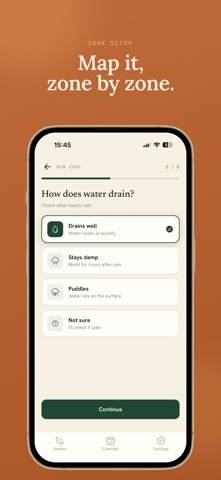
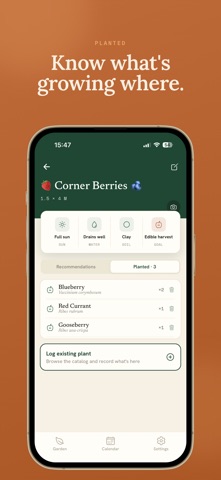
Gardned turns your garden's real conditions into a plan you can actually follow. Tell it about each zone - sun, soil, drainage, size - and Gardned's AI recommends the right plants and builds a care calendar tuned to your conditions and the season. A plan, not a guess. PLANTS PICKED FOR YOUR ZONE Add a zone - a raised bed, border, patio or plot - and get AI plant recommendations matched to its specific sun, soil and drainage. Each pick includes spacing, planting depth, a seasonal plan and care notes, so you know exactly what to put where. A CARE CALENDAR THAT KNOWS YOUR PLANTS Gardned generates weekly tasks timed to your plants and the season - watering, pruning, feeding, harvesting. Never miss a watering again. See what needs doing today, this week, and through the year. MAP YOUR GARDEN, ZONE BY ZONE Every part of a garden is different. Manage multiple zones across one or more gardens, each with its own tailored advice - because a shaded border and a sunny vegetable patch need completely different care. KNOW WHAT'S GROWING WHERE Log the plants in each zone and build a living record of your garden over time. Track what you've planted, what's thriving, and what's coming next. BUILT FOR REAL GARDENERS Whether you're growing food on a balcony or managing a large plot, Gardned adapts to how you garden - not the other way around. Simple to start, and more useful the more you grow. Plan smarter. Grow with confidence. Download Gardned today. Terms of Use (EULA): https://www.apple.com/legal/internet-services/itunes/dev/stdeula/ Privacy Policy: https://gardned.com/privacy
Latest release
What’s New
See your first planting plan before you sign up. Answer four quick questions about a spot in your garden - sun, drainage, soil, and what you want to grow - and Gardned builds a real planting plan for your conditions straight away. No account needed to see it. Like what you get? Create a free account and your plan is saved, along with care reminders for everything in it.
Audience growth
Ratings growth
Baseline captured. Growth appears after the crawler observes a changed rating count.
Momentum comes from crawler snapshots for the tracked storefront. “Viral growth signal” means unusually fast recent rating gains; it is an indicator, not download data.
Price tracking
Price intelligence
First snapshot captured. The trend line starts after the next crawler price observation.
- First observed Sep 1, 2026 · 2:28 PM Free
Screenshots