About this app
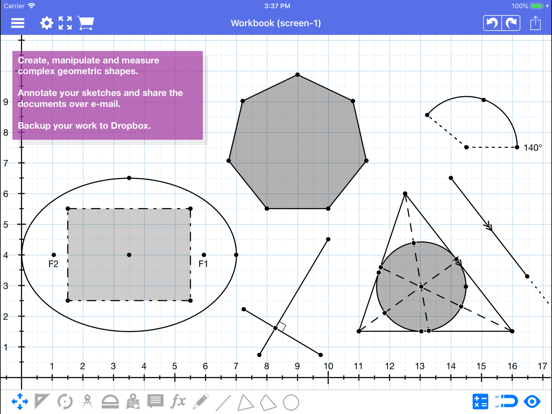
With Geometry Pad you can create fundamental geometric shapes, explore and change their properties, and calculate metrics. The shapes are displayed on a scrollable and zoomable workbook with a rectangular coordinate system. The following tools are built into the application: - Point, angle, line, ray, segment, perpendicular bisector, tangent, triangle, quadrilateral, polygon, regular polygon, arc, sector, circle, ellipse, parabola, hyperbola. - Tools to create medians, altitudes and bisectors in a triangle. - Tools to create special triangles and quadrilaterals: right, isosceles, equilateral, square, rectangle, parallelogram and rhombus. - Two additional ways to create an ellipse: by center, end of a major axis, and a point on the ellipse; by focus points, and a point on the ellipse. - Compass tool to plot arcs with an easily adjustable center and radius. - Pencil tool to draw freehand annotations. - Text annotations and labels with mixed-in metrics such as length, angle, perimeter, equation, etc. - Transformation tools: rotation, reflection, enlargement, translation. - Create lines and triangles with predefined parameters such as equation of a line, and angles or sides of a triangle. - Insert images into the document. Each shape has a set of customizable properties such as color, width, background, etc. Shape metrics are automatically calculated and presented along with shape properties. Some of them are editable such as point location, line length, circe radius, etc. Snapping is deeply integrated into the application. Snap-to-grid and snap-to-objects allow for precise constructions. Additionally, lines can snap to parallel, perpendicular and tangent lines. Snapping can be easily turned on/off in the quick snapping settings window. Documents can be saved to your device, iCloud or to Dropbox. Export formats include PDF and image. Additionally, PDF documents can be opened within the app, annotated using any of the built in tools and exported as PDF again. Your suggestions are welcomed and appreciated. Just select Feedback under the app menu and write us an e-mail.
Latest release
What’s New
Bug fixes and minor improvements
Audience growth
Ratings growth
Baseline captured. Growth appears after the crawler observes a changed rating count.
Momentum comes from crawler snapshots for the tracked storefront. “Viral growth signal” means unusually fast recent rating gains; it is an indicator, not download data.
Price tracking
Price intelligence
First snapshot captured. The trend line starts after the next crawler price observation.
- First observed Aug 19, 2026 · 8:51 PM Free
Screenshots