About this app
GigFlow: Intelligent Earnings & Financial Management for Gig Workers GigFlow is an all-in-one financial automation platform designed specifically for gig economy workers. Powered by advanced Robotic Process Automation (RPA) and AI, GigFlow makes it effortless to track your earnings, optimize payouts, estimate taxes, and manage your finances—all in one place. Key Features - Automated Earnings Tracking Securely connect your Uber, Lyft, DoorDash, Upwork, Fiverr, and more. GigFlow automatically imports your earnings using official APIs and smart data collection, so you never miss a payment. - Payout Optimization Get paid faster and with lower fees! GigFlow recommends the best payout method (Stripe, PayPal, ACH) based on your preferences and real-time transaction costs. - AI-Powered Expense Categorization Connect your accounts and let AI automatically classify your expenses, helping you identify tax-deductible costs and optimize your finances. - Smart Tax Estimation & Alerts GigFlow’s intelligent engine tracks your income and expenses, calculates estimated taxes, and sends you timely reminders so you’re always prepared. - Automated Financial Reports Get clear, easy-to-read dashboards and downloadable reports summarizing your weekly, monthly, and annual financial activity. How GigFlow Works Connect accounts: Secure OAuth integration for gig platforms and banks. Automated data collection: RPA bots gather your earnings, even from platforms without APIs. Optimized payouts: Choose instant payouts or ACH transfers—GigFlow finds the best option. Expense & tax management: AI sorts your expenses and estimates taxes in real time. Financial insights: Track your financial health and trends with one tap. Built for Security & Privacy Secure authentication & end-to-end encryption. Compliant with SOC 2, GDPR, and CCPA standards. Your data stays private and protected. Who is GigFlow for? Rideshare drivers (Uber, Lyft) Delivery partners (DoorDash, etc.) Freelancers (Upwork, Fiverr) Anyone earning through gig platforms! Coming Soon Support for more gig platforms. Personalized financial recommendations and income forecasts. Automated credit scoring and financial health checks. Take control of your gig earnings—download GigFlow today and simplify your financial life! Contact & Support: For support or questions, email to support@gigflowapp.com
Latest release
What’s New
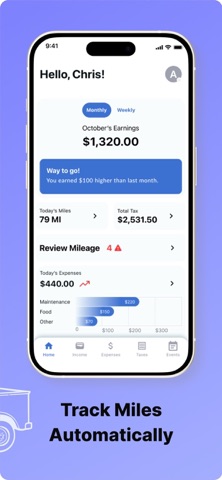
Auto mileage tracking feature introduced Autocomplete location search added for event creation General bug fixes and performance enhancements Localization improvements
Audience growth
Ratings growth
Baseline captured. Growth appears after the crawler observes a changed rating count.
Momentum comes from crawler snapshots for the tracked storefront. “Viral growth signal” means unusually fast recent rating gains; it is an indicator, not download data.
Price tracking
Price intelligence
First snapshot captured. The trend line starts after the next crawler price observation.
- First observed Sep 1, 2026 · 2:50 PM Free
Screenshots