About this app
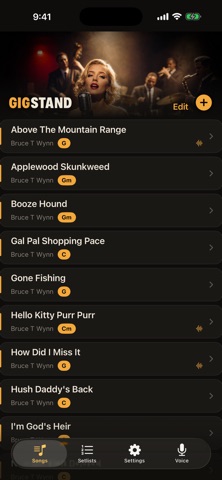
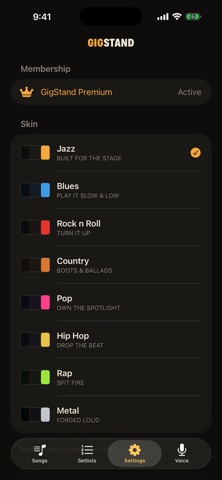
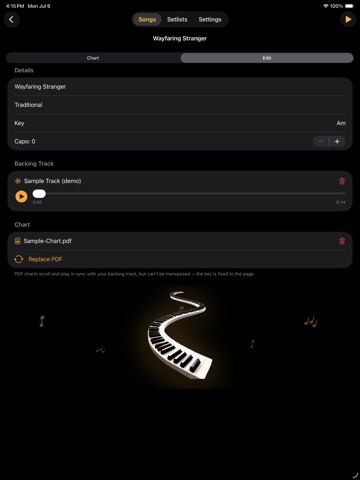
GigStand is the stage rig for gigging musicians — your charts, your setlists, and your backing tracks in one beautiful, dark, built-for-the-room app. On iPhone, iPad AND Mac. No clutter, no internet required, nothing between you and the song. START IN SECONDS • New here? Tap "Load Sample Setlist" for a dozen ready-to-play demo songs — charts and backing tracks included — and explore the whole app before adding a note of your own. CHARTS YOUR WAY • Type chords over lyrics in simple ChordPro — [G]just like [C]this. • Or import a PDF chart (straight from Chordify and friends). • Transpose text charts to any key in one tap, and bump the text size for tired eyes. AI CHART ASSISTANT (PREMIUM) • Have the words and the chords but hate placing every bracket? Paste your lyrics and chords and get back a clean, stage-ready chart in seconds. GAUGE — DID THAT REWRITE ACTUALLY WORK? • Every songwriter revises a song, then wonders: better, or worse? • Gauge captures a room's honest reaction and compares your versions — so you finally know. • Find your standout songs before you build the set. STAGE MODE • Big, bright, adjustable text on black — readable across a dark stage. • Smooth auto-scroll with precise, single-step speed control, so your hands stay on the instrument. • The screen never sleeps mid-song. • Tap once to hide every control and just play. BACKING TRACKS — YOUR BAND IN A BOX • Attach your own MP3, M4A, or WAV to any song. • Hit play and the chart scrolls in time with the track, start to finish. • One stomp of a foot pedal starts the whole song, hands-free. PERFECT TIMING — INTRO DELAY & AUTO-SYNC • Long instrumental intro? Set an Intro Delay and the chart waits after you hit play, then scrolls in right as the singing starts — so your first line is never gone before you sing it. An on-screen countdown keeps you calm. • Even easier: Auto-Sync. Play the track, tap once when the vocal comes in, and GigStand sets the delay AND paces the scroll to the song for you — no speed to fiddle with, and it stays in sync even when you resize the text. • Your scroll speed is remembered for every song. SETLISTS • Build a show with multiple sets, drag-to-reorder, and break timers. • Per-gig key overrides and notes. • Run the entire show in Stage Mode without lifting a finger. VOICE SETLISTS • Build and edit your set just by talking — "add Gone Fishing to Friday's second set." • Hands-free setlist building for the middle of rehearsal. (On supported devices.) HANDS-FREE FOOT PEDAL • Pair any Bluetooth page-turner pedal (AirTurn and friends). • Start/stop the song with one foot, advance to the next with the other. MAKE IT YOURS — GENRE SKINS • Jazz, Blues, Rock n Roll, Country, Pop, Hip Hop, Rap, Metal. • Pick your sound and the whole app dresses to match. 100% OFFLINE Everything lives on your iPhone, iPad, or Mac. No account, no dropouts when the venue Wi-Fi dies — just you and the music. (The optional AI Chart Assistant is the one feature that uses the internet.) Built by a gigging musician, for the room you play in. Privacy Policy: https://maverick9123.github.io/gigstand-privacy/ Terms of Use (EULA): https://www.apple.com/legal/internet-services/itunes/dev/stdeula/
Latest release
What’s New
Long intros, solved. NEW — Intro Delay Got a song that opens with a long instrumental intro? Set an intro delay and your chart holds still after you hit play, then starts scrolling right as the singing begins — so your first line is never gone before you get to it. An on-screen "Scrolling in…" countdown keeps you calm, and a tap or a foot-pedal press starts it early if the band stretches the intro. NEW — Auto-Sync (Sample the Song) Even easier: play the track and tap once the moment the singing starts. From that single tap, GigStand sets the intro delay AND paces the scroll to your song automatically — no scroll speed to fiddle with. Smarter scrolling • Auto-paced scroll stays perfectly in sync even when you make the text bigger or smaller. • Your scroll speed is now remembered for each song. You can finally delete all that blank-line padding — GigStand handles the timing now. Break a leg out there.
Audience growth
Ratings growth
Baseline captured. Growth appears after the crawler observes a changed rating count.
Momentum comes from crawler snapshots for the tracked storefront. “Viral growth signal” means unusually fast recent rating gains; it is an indicator, not download data.
Price tracking
Price intelligence
First snapshot captured. The trend line starts after the next crawler price observation.
- First observed Sep 4, 2026 · 7:55 AM Free
Screenshots