About this app
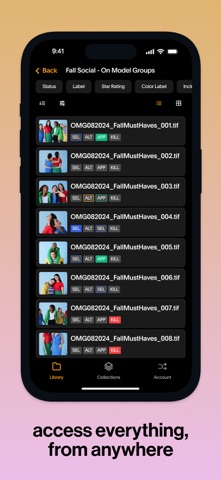
Globaledit Mobile App: Your Creative Workspace, Anywhere The Globaledit mobile app extends the power of our enterprise Digital Asset Management software to your mobile device, providing a single source of truth for your team’s entire visual workflow. Key Features & Benefits: 1. Centralized Asset Management: Effortlessly access all your assigned workspaces and image collections in one place. Quickly see who has access to what, maintain a detailed historical record, and stay on top of version control. 2. Streamlined Collaboration: Perfectly synchronize between photography, art direction, and retouching. Give and respond to feedback with the app designed for creative teams, enabling seamless collaboration from anywhere. 3. Real-Time Ratings, Labels & Status Updates: Rate images, assign labels, and update the status of assets directly from the app, keeping your projects moving smoothly and making sure everyone stays in sync, whether you're in the studio or on the go. 4. Comprehensive Filters & Labeling: Filter assets based on ratings (1-5 stars), labels (approval status, retouching selection, alternates, or killed), and specific status states (to-do, in progress, complete). Ensure your team stays aligned on the project’s status with just a few taps. 5. Interactive Feedback & Markups: View and leave comments on assets, @mention teammates to assign tasks, and collaborate in real time. Create markups, draw, comment, or add shapes to convey changes clearly, making feedback loops faster and more effective. 6. Detailed Asset Info at Your Fingertips: Access detailed metadata such as image size, dimensions, resolution, file type, and creation/modification dates, ensuring you have all the technical details you need on the go. With Globaledit mobile, you’re always connected, always in sync, and always ready to move your creative projects forward.
Latest release
What’s New
We've added the ability to compare versions of your assets on mobile. Review, make latest, and delete older versions of assets.
Audience growth
Ratings growth
Baseline captured. Growth appears after the crawler observes a changed rating count.
Momentum comes from crawler snapshots for the tracked storefront. “Viral growth signal” means unusually fast recent rating gains; it is an indicator, not download data.
Price tracking
Price intelligence
First snapshot captured. The trend line starts after the next crawler price observation.
- First observed Sep 6, 2026 · 5:54 PM Free
Screenshots