About this app
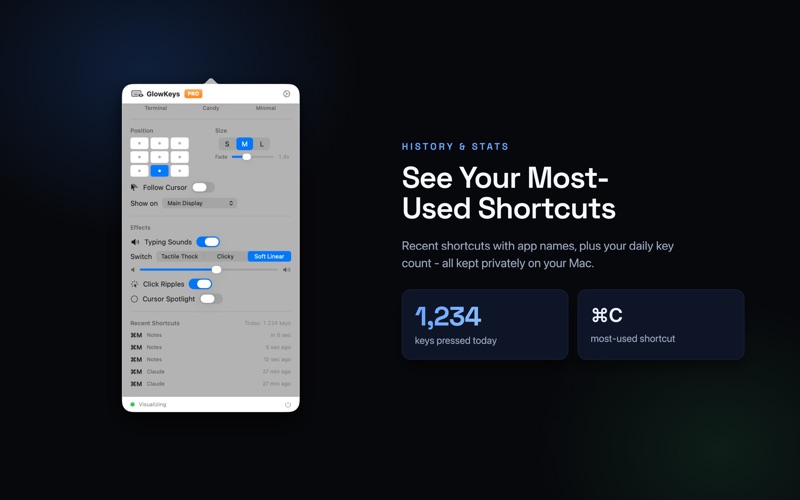
Show your keystrokes on screen - beautifully. GlowKeys displays every key press, keyboard shortcut, and mouse click as elegant animated overlays on top of any app. Perfect for tutorials, screencasts, live demos, presentations, online teaching, and pair programming: your audience finally sees exactly what your fingers are doing. WHY PRESENTERS CHOOSE GLOWKEYS • Crisp, readable HUD with real key symbols: ⌘ ⌥ ⌃ ⇧, arrows, function keys • Works in full-screen apps and across all Spaces - your recording never loses the overlay • Fully click-through: the overlay never steals focus or blocks your mouse • Instant toggle: press ⌃⌥K anywhere, or Option-click the menu bar icon • Compatible with any recorder or meeting app: QuickTime, OBS, ScreenFlow, Zoom, Meet, Teams TWO DISPLAY MODES • All Keys - show everything you type, grouped into readable chunks • Shortcuts Only - display just ⌘ / ⌃ / ⌥ combos and keep plain typing private Repeated shortcuts stack neatly (⌘V ×3), held modifiers appear while you press them, and every chip fades out on your schedule. SIX HAND-TUNED THEMES From the neon signature Glow to clean Snow, hacker Terminal, playful Candy, sober Graphite, and a minimal bubble-free style. Three sizes, nine screen positions, adjustable fade time. WOW FEATURES YOU WON'T FIND ELSEWHERE • Typing Sounds - satisfying mechanical switch sounds (Thock, Clicky, Soft) with every keystroke, even when the HUD is hidden • Follow Cursor - the HUD travels with your pointer, so viewers never look away from the action • Click Ripples - every mouse click sends out an elegant ripple • Cursor Spotlight - a soft halo makes your pointer impossible to lose • Multi-Display - show the HUD on your main screen, the screen with the cursor, or every screen at once SHORTCUT HISTORY & STATS See your recent shortcuts with the app they were used in, daily keystroke counts, and your most-used combos. Great for teaching shortcuts — and a little addictive. PRIVATE BY DESIGN • Nothing you type ever leaves your Mac • Plain typed text is never stored - only shortcut combos and key counts • Password fields are protected by macOS Secure Input and are never captured • Statistics are local and can be reset with one click MADE FOR • Course creators and YouTubers recording tutorials • Developers giving live demos and pairing sessions • Teachers and trainers showing keyboard shortcuts • Streamers, designers, support teams, and conference speakers FREE VS PRO GlowKeys is free to use with two themes, both display modes, all nine positions, repeat grouping, and shortcut history. GlowKeys Pro unlocks all six themes, mechanical typing sounds, click ripples, cursor spotlight, follow-cursor mode, and multi-display support. Choose a monthly or yearly subscription (with a free trial) or a one-time lifetime purchase. Subscriptions renew automatically unless auto-renewal is turned off at least 24 hours before the end of the current period. You can manage and cancel subscriptions in your App Store account settings at any time. Terms of Use: https://www.apple.com/legal/internet-services/itunes/dev/stdeula/ Questions or ideas? We read everything - reach us via the Support link.
Audience growth
Ratings growth
Baseline captured. Growth appears after the crawler observes a changed rating count.
Momentum comes from crawler snapshots for the tracked storefront. “Viral growth signal” means unusually fast recent rating gains; it is an indicator, not download data.
Price tracking
Price intelligence
First snapshot captured. The trend line starts after the next crawler price observation.
- First observed Aug 8, 2026 · 5:15 PM Free
Screenshots