About this app
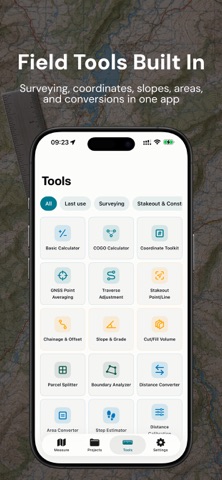
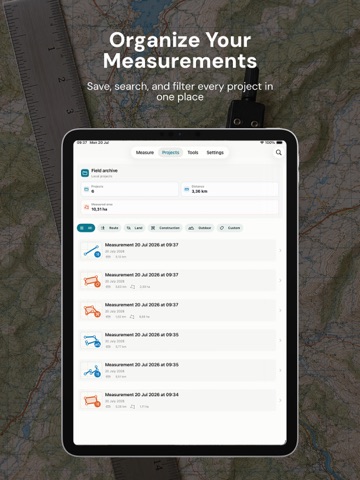
Distance Calculator is a practical GPS map measurement app for land, routes, property checks, field work, construction planning, landscaping, and everyday outdoor estimates. Measure distance, area, perimeter, bearings, and elevation details directly on Apple Maps. Drop points manually, use your current GPS location, search for places or coordinates, and save measurements as reusable field projects. Key features: • Measure route distance with multiple map points • Calculate land area and closed-polygon perimeter • View distance, area, bearing, elevation gain/loss, and last point coordinates • Add points from map taps, GPS location, search, or coordinates • Save projects with categories, notes, and photos • Search, filter, rename, reopen, and manage saved projects • Export Summary, GeoJSON, GPX, and KML • Switch between standard, imagery, and hybrid map styles • Use metric and imperial units, including meters, kilometers, feet, yards, miles, square feet, acres, and hectares • Display coordinates in decimal degrees or DMS Built-in field tools: • Basic Calculator • COGO Calculator • Coordinate Toolkit • GNSS Point Averaging • Traverse Adjustment • Stakeout Point/Line • Chainage & Offset • Slope & Grade • Cut/Fill Volume • Parcel Splitter • Boundary Analyzer • Distance Converter • Area Converter • Step Estimator • Distance Calibration In-App Purchase: Distance Calculator is free to use and may show ads. A one-time in-app purchase is available to remove banner and interstitial ads across the app. This purchase does not require a subscription. Disclaimer: Measurements are estimates and depend on GPS accuracy, map data, device sensors, signal conditions, and user input. Distance Calculator is not a replacement for professional surveying equipment, legal land surveys, cadastral records, engineering verification, or safety-critical navigation. Always verify important measurements with qualified professionals and official documents before making legal, construction, financial, or safety-related decisions.
Audience growth
Ratings growth
Baseline captured. Growth appears after the crawler observes a changed rating count.
Momentum comes from crawler snapshots for the tracked storefront. “Viral growth signal” means unusually fast recent rating gains; it is an indicator, not download data.
Price tracking
Price intelligence
First snapshot captured. The trend line starts after the next crawler price observation.
- First observed Aug 11, 2026 · 1:53 AM Free
Screenshots