About this app
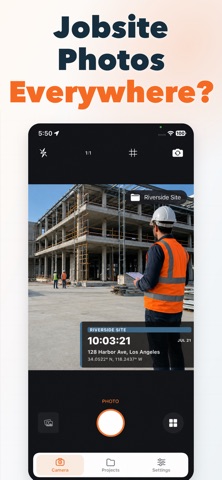
Turn every field photo into a clear, organized work record. GPS Map & Timestamp Camera is built for contractors, inspectors, property managers, technicians and field professionals who need to document when and where work happened. Capture a photo and add the important details directly to the image—including date, time, GPS location, address, coordinates, direction, project name, notes and photo numbers. DOCUMENT EVERY JOB Create separate projects for construction sites, property inspections, maintenance work, installations, deliveries and other field activities. Keep related photos together instead of searching through an unorganized camera roll. ADD TIME AND LOCATION STAMPS Display useful field information directly on every photo: • Date and time • GPS coordinates • Street address • Location accuracy • Compass direction • Project name • Custom notes • Sequential photo numbers BUILT FOR FIELD WORK Choose from professional stamp templates designed for different situations, including field proof, inspections, GPS records and minimal timestamp photos. Customize the visible information, stamp position, colors and layout before capturing your photo. USE IT FOR • Construction progress photos • Property and home inspections • Maintenance documentation • HVAC, plumbing and electrical work • Installation and repair records • Landscaping and cleaning services • Delivery and service confirmation • Before-and-after documentation • Insurance and property records • General field reports ORGANIZED BY PROJECT Switch projects directly from the camera, capture a sequence of numbered photos and review every field record in one place. PRIVATE AND RELIABLE Your projects and photos are stored locally on your device. No account is required to start documenting your work. Capture the details. Organize the job. Keep reliable photo records wherever you work. Legal Terms of Use: https://sites.google.com/view/myoutappterms-of-service Privacy Policy:https://sites.google.com/view/myoutapps-privacypolicy
Audience growth
Ratings growth
Baseline captured. Growth appears after the crawler observes a changed rating count.
Momentum comes from crawler snapshots for the tracked storefront. “Viral growth signal” means unusually fast recent rating gains; it is an indicator, not download data.
Price tracking
Price intelligence
First snapshot captured. The trend line starts after the next crawler price observation.
- First observed Aug 11, 2026 · 3:10 AM Free
Screenshots