About this app
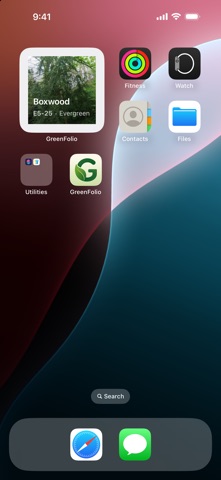
GreenFolio is the easiest way to catalog, organize, and care for your entire plant collection — from a single windowsill succulent to a whole greenhouse. Snap a photo, add a few details, and GreenFolio gives every plant a tidy home with its own ID, type, notes, and tags. Browse your collection as a photo grid or grouped by type, search instantly, and filter down to exactly what you're looking for. BLOOMS — YOUR PLANTS, AS A STORY • GreenFolio builds cinematic little films from photos you already have — a type collection, one plant's growth over a year, a cutting beside the plant it came from, or the anniversary of the day something joined you • They play full-screen with music, motion, and your plant names as captions • Make your own from any plants you choose, or edit the ones GreenFolio suggests • A year in review with your real numbers woven through the photos • Export as a video — story, square, or widescreen — or share it as a link • On an Apple Intelligence device, GreenFolio writes the title for you • Built on your device from your own collection — nothing new is uploaded, and you can turn the whole thing off in Settings CATALOG YOUR COLLECTION • Add plants with multiple photos and choose the cover shot • Automatic plant IDs organized by type (e.g. C40-24) • Notes, tags, acquisition year, and custom plant types • Grid view or grouped-by-type view, with instant search and filters • Import an existing collection from a CSV file CARE LOG AND REMINDERS • Log watering, feeding, and repotting with one tap • Set a reminder interval per plant and get a notification when it's due • Reminders are delivered by your phone, so they arrive with or without a connection • Define your own care types to match how you actually look after your collection KEEP WORKING WITHOUT A SIGNAL • Add, edit, and delete plants with no connection — even attach photos • Your changes are saved on the device and sent the moment you're back online • A badge tells you when anything is still waiting PROPAGATION LINEAGE • Record which plant a cutting came from • See the parent and its cuttings on the plant's page PRINTABLE POT LABELS • Export a label with the plant's ID, name, and a QR code • Scanning it opens that plant's share page — ideal for a tray of seedlings that all look alike MILESTONES AND INSIGHTS • Collection stats at a glance • Anniversaries, collection size, care volume, and logging streaks SMART PLANT TOOLS • Identify a plant from a photo • Optional online lookup via Pl@ntNet, run by French research institutes, for a stronger species match — off by default, and honest with you when it isn't sure • On an Apple Intelligence device, GreenFolio also diagnoses common health problems and answers watering, light, and soil questions — privately, on the device itself SHARE WHAT YOU GROW • Share a plant or your whole collection with a link that previews its name and photo • Follow a community of plant lovers and see what others are growing • Report and block controls keep the community respectful BUILT FOR YOUR DEVICES • Native iPhone and iPad app • System, Light, or Dark appearance — the whole app is tuned for dark mode • Home Screen widget featuring a plant from your collection • Spotlight search — jump straight to any plant • Syncs with the GreenFolio web app so your collection is everywhere PRIVATE BY DESIGN • Your collection is yours — no ads, no tracking, no selling your data • Delete your account and data any time, right from Settings Whether you're a casual houseplant keeper or a serious collector, GreenFolio keeps your plants organized, healthy, and beautifully documented.
Latest release
What’s New
A BIGGER, BETTER-LOOKING GREENFOLIO HEALTH & CARE Ask about a plant and get a straight answer. Health checks and the care assistant are one sheet now: check a photo for problems, talk it through as the reply streams in, and re-check the same plant later. Every answer is kept, so you can see what you asked in June when the same leaf browns in September. INSIGHTS There is a lot more to look at. A growth chart and a care heatmap, survival by type, and how long you have been collecting. A leaderboard with standings and a window you can change, opt-in notifications when your rank moves, and collector profiles you can open and follow. Empty states now name the next useful thing to do instead of shrugging. COLLECTING See how complete your sets are, take on a weekly grow-off against other collectors, and find out how rare each plant is — rare ones get a treated photo frame. Adding a plant gets a moment of its own with the mint sequence, and you can hand a plant to another collector as a gift. YOUR PHOTOS Then & now plays a plant's photos in order, so a year of growth takes three seconds to watch. The photo studio has two new passes, Bloom boost and Depth, and Filter Lab presets you can apply in a tap. Photos now date themselves from when they were taken. INTERFACE ENHANCEMENTS Empty screens are illustrated instead of showing a generic system icon, milestones have their own badges, and a plant without a photo gets a drawing chosen from its type rather than a flat leaf — all of it drawn for light and dark mode. THE PLANT CARD, REDRAWN The photo is the card now, in a taller frame, with the name and its number set quietly underneath instead of stacked on top of the picture. AND THROUGHOUT The app answers your touch — a light tap when you log care, a firmer one when something is saved or deleted; turn haptics off in Settings. Screens and charts move more smoothly. There are more icon styles to pick for your plant types. And the app icon has dark and tinted appearances on iOS 18.
Audience growth
Ratings growth
Momentum comes from crawler snapshots for the tracked storefront. “Viral growth signal” means unusually fast recent rating gains; it is an indicator, not download data.
Price tracking
Price intelligence
- First observed Aug 15, 2026 · 7:39 AM Free
Screenshots