About this app
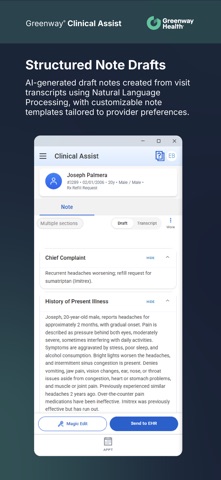
This innovative app leverages advanced AI technology to save valuable time and enhance documentation efficiency. *The Greenway Clinical Assist App requires a licensed Greenway EHR* Key Features: · Efficient Clinical Note Generation: Generate clinical notes directly from patient-provider conversations. Simply enable the microphone to record, conduct the patient visit, and Greenway Clinical Assist will automatically create the note for you. · User-Friendly Interface: Easily navigate through appointment lists to view your schedule efficiently and use AI-driven technology to create accurate and detailed progress notes. · Seamless User Experience: Intuitive design makes it easy for healthcare professionals to navigate and use. Enjoy a comprehensive set of tools that enable you to modify generated clinical notes with ease. · Greenway EHR Integration. Send your completed note to your Greenway EHR with the tap of a button. · Secure and Compliant: Adheres to the highest standards of data security and regulatory compliance. · Greenway Support: Our dedicated support team is available to assist you with any issues. Why Choose Greenway Clinical Assist? · Reduce Burnout: Streamline your workflow and reduce burnout with our advanced AI technology. · Enhance Documentation Efficiency: Save valuable time and enhance the accuracy of your clinical documentation. · Future of Clinical Documentation: Experience the future of clinical documentation with Greenway Clinical Assist and transform your workflow with ease and efficiency. Download Greenway Clinical Assist today and take the first step towards a more efficient and effective clinical practice!
Latest release
What’s New
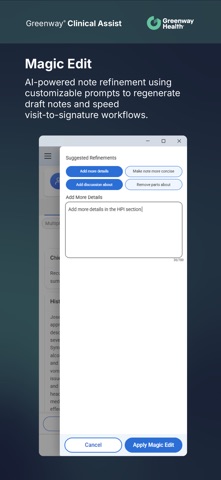
Clinical Assist helps clinical providers move faster from schedule review to completed note. Clinical Assist 3.5 includes these features for both desktop and mobile: • A calendar-forward Appointments experience • Smart auto-scroll to help you return quickly to the most relevant visit • Improved appointment search, refresh, appointment counts, and status indicators • Expanded access to past schedules and upcoming appointments • Pre-noting before recording begins, with pre-noted content merged into the generated draft • Simplified visit setup with language and note template selections • Suggested ICD-10 diagnoses generated based on visit transcript paired with Human-in-the-Loop design, allowing you to decide which diagnoses to accept and send with the note • HCC indicators next to eligible ICD-10 suggestions to support coding review • Inline draft editing with autosave and Quick Text support • Magic Edit enhancements to help refine draft notes more efficiently • Self-service audit report generation for authorized users
Audience growth
Ratings growth
Baseline captured. Growth appears after the crawler observes a changed rating count.
Momentum comes from crawler snapshots for the tracked storefront. “Viral growth signal” means unusually fast recent rating gains; it is an indicator, not download data.
Price tracking
Price intelligence
First snapshot captured. The trend line starts after the next crawler price observation.
- First observed Aug 20, 2026 · 7:13 PM Free
Screenshots