About this app
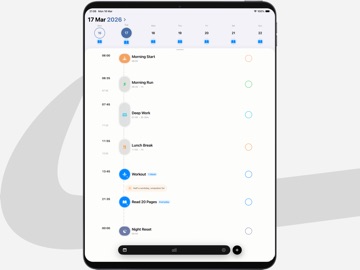
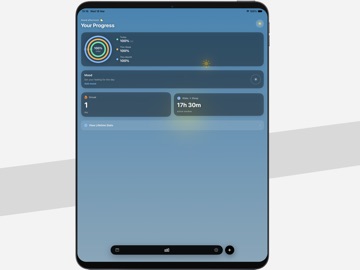
Line — Daily Planner Design your day in a way that actually fits real life. Line is a visual daily planner that organizes your entire day into a clean, scrollable timeline — from morning to night. No clutter, no switching between tools. Everything you plan and track lives in one place. SEE YOUR DAY ON A SINGLE LINE Most planners show lists. Line shows flow. Arrange your day on a vertical timeline where every task and event has its place. Drag to reschedule, stretch to adjust duration, and instantly understand how your time is distributed. Your plan updates as your day evolves — fast, simple, and visual. BUILD CONSISTENCY WITH HABITS Line includes a lightweight habit system directly inside your day. Add routines, track completions, and stay consistent without switching apps. Simple tracking, clear progress, and streaks that reflect your real behavior over time. WHY LINE WORKS DIFFERENTLY Full-day timeline view from start to end Drag-and-drop planning with real-time adjustments Built-in habit tracking with streaks and progress Automatic gap awareness to help you use free time better Daily reminders for planning and reflection Flexible habit types with customizable targets Backup and export options Minimal, distraction-free design YOUR DAY, CLEAR AND STRUCTURED Whether you're planning deep work, building routines, or just trying to stay on top of things — Line helps you stay aware of how your time is actually spent. Plan clearly. Adjust quickly. Stay consistent. PREMIUM — PAY ONCE Unlock unlimited events, habits, customization, and full features with a one-time purchase. No subscriptions. No recurring fees. Start your day with clarity. Stay on track with Line. LEGAL Privacy Policy: https://manhcuong5311-hue.github.io/Structify-legal/ Terms of Use: https://manhcuong5311-hue.github.io/Structify-legal/terms.html End User License Agreement (EULA): https://www.apple.com/legal/internet-services/itunes/dev/stdeula/
Latest release
What’s New
This release focuses on data reliability and a cleaner detail view: • Fixed: all-day events couldn't be created • Past schedule is now locked — editing a future event or habit no longer shifts days that have already passed • Quick undo for accidental deletes • Redesigned detail sheet — cleaner, more complete; habits now show last 7 days, 30-day rate, and best streak • Delete moved into the ⋯ menu to prevent mis-taps • Empty timeline now shows quick-add suggestions • Hitting the free-tier limit now shows the Upgrade prompt upfront, instead of after filling a form • Smoother, more battery-friendly saves
Audience growth
Ratings growth
Baseline captured. Growth appears after the crawler observes a changed rating count.
Momentum comes from crawler snapshots for the tracked storefront. “Viral growth signal” means unusually fast recent rating gains; it is an indicator, not download data.
Price tracking
Price intelligence
First snapshot captured. The trend line starts after the next crawler price observation.
- First observed Sep 7, 2026 · 11:34 PM Free
Screenshots