About this app
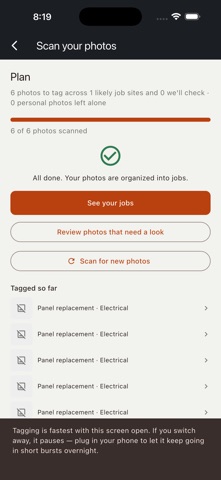
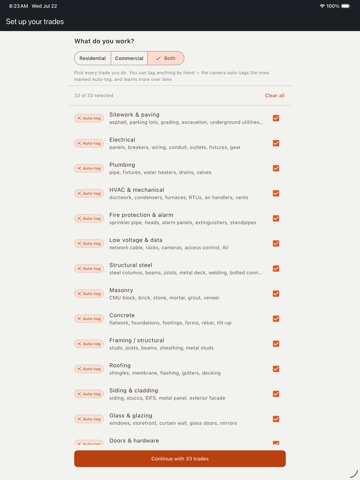
Stop scrolling through 5,000 photos to find "that one electrical panel shot." Hard Work turns your camera roll into an organized job history — automatically, entirely on your phone. HOW IT WORKS Tap "Scan all my photos" once. Hard Work reads your job-site photos, figures out what trade and task each one shows, and groups them into jobs by site and date. No manual sorting, no folders, no typing. Didn't like a tag? Fix it in one tap. Every tag is a suggestion, not a verdict — you're always in control of what's on a job. FIND ANYTHING, INSTANTLY Search the way you'd actually describe a photo — "backsplash," "panel replacement," "roof tear-off" — and Hard Work finds every match across every job, instantly. BUILT FOR EVERY TRADE 33 trades and 258 specific tasks, covering both residential and commercial work — electrical, plumbing, HVAC, roofing, framing, concrete, masonry, tile, painting, landscaping, solar, and more. Pick only the trades you actually do; Hard Work tags what applies to your business. SHOWCASE YOUR BEST WORK Star your best job photos and Hard Work builds a clean, shareable showcase automatically — a fast way to show a prospective client real finished work, no photo-editing app required. PRIVACY, BY DESIGN — NOT BY POLICY Every photo is read and tagged on your device. Nothing is ever uploaded to a server, a cloud, or anyone else — not for AI processing, not for backup, not for anything. Photos your phone can't confidently tell are job-related are automatically set aside as personal, and you can mark any photo personal by hand at any time — the moment you do, even the cached copy is deleted. FREE TO START • Tag any photo by hand, one at a time — free, forever, no limit. • Automatically scan your first 100 photos — free. • Unlock unlimited automatic scanning with Hard Work Pro — a one-time purchase. No subscription, ever. ON YOUR PHONE, NOT IN THE CLOUD Hard Work uses your device's own built-in AI where available, or a compact vision model that runs locally after a one-time download. Either way, your photos never leave your phone. Built for contractors who've stood in a driveway trying to remember which job that pipe photo was even from.
Latest release
What’s New
Performance tweaks
Audience growth
Ratings growth
Baseline captured. Growth appears after the crawler observes a changed rating count.
Momentum comes from crawler snapshots for the tracked storefront. “Viral growth signal” means unusually fast recent rating gains; it is an indicator, not download data.
Price tracking
Price intelligence
First snapshot captured. The trend line starts after the next crawler price observation.
- First observed Aug 24, 2026 · 12:13 AM Free
Screenshots