About this app
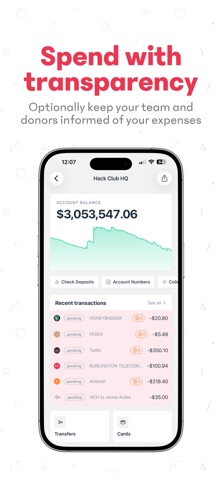
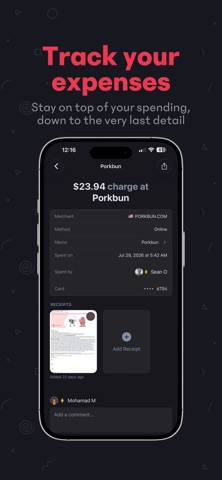
HCB is the nonprofit neobank powering local hackathons, clubs, and teams by providing them with 501(c)(3) status. Collect donations, send payments, issue cards, and manage funds with ease. Focus on building—we’ll handle the money. HCB Mobile puts all of that power at your fingertips. It brings the full HCB experience to your phone so you can manage cards, track expenses, and accept donations—anytime, anywhere. Stay connected with your organizations and keep up with every transaction, balance change, and update in real time. Key Features: Track Your Organization Monitor balances, review transactions, and stay on top of all your organization’s activity from one simple dashboard—anytime, anywhere. Manage Cards Instantly Add your cards directly to Apple Wallet or Google Wallet with a single tap, without having to enter the card details manually. Need a new card on the go? Issue one right from your phone. Lost your card while shopping? Freeze it instantly with just a tap to keep your funds secure. Effortless Receipt Tracking We know how painful it is to manage receipts, so we put it right in the app. Upload photos directly from camera rolls, share receipts from other apps, or match existing receipts to transactions with a single tap. No more lost receipts. Accept Donations Anywhere Use your phone as a terminal and take contactless donations right on your mobile device. No additional hardware required. Ideal for fundraising events, tabling, or taking contributions anywhere, anytime.
Latest release
What’s New
The biggest HCB update yet! • Transfers, all in one place: send ACH transfers, mail checks, wire money internationally, and move funds between HCB organizations. • Deposit checks with your camera and track their status. • A new organization dashboard with your balance over time, recent activity, and quick actions. • Manage your team: see everyone, send invites, and remove members. • Share links to organizations, transactions, cards, and donation pages. • A refreshed look throughout • Squashed a long list of bugs.
Audience growth
Ratings growth
Baseline captured. Growth appears after the crawler observes a changed rating count.
Momentum comes from crawler snapshots for the tracked storefront. “Viral growth signal” means unusually fast recent rating gains; it is an indicator, not download data.
Price tracking
Price intelligence
First snapshot captured. The trend line starts after the next crawler price observation.
- First observed Sep 8, 2026 · 9:16 PM Free
Screenshots