About this app
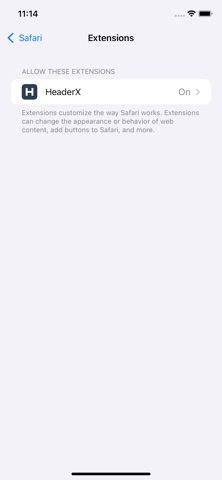
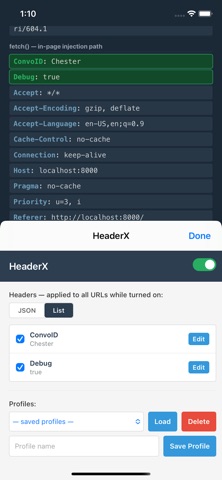
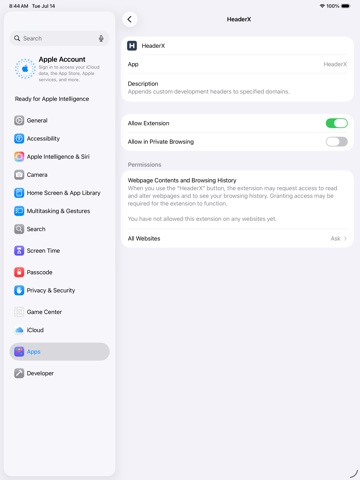
HeaderX injects custom HTTP request headers into your Safari browsing session — the essential companion for web developers, API testers, and QA engineers. Point HeaderX at your development environment, define your headers once, and flip them on whenever you need them. No proxy setup, no configuration files, no leaving the browser. DEFINE HEADERS AS JSON Describe your headers in a simple JSON editor — paste an entire set at once: {"X-Debug-Mode": "enabled", "Authorization": "Bearer dev-token"} Or use the array format to keep headers saved but individually switched off. TWO VIEWS, ONE TOGGLE Edit as raw JSON or flip to List view, where every header gets its own checkbox. The master toggle in the corner turns everything on or off instantly — your configuration stays saved either way. REUSABLE PROFILES Save named header sets — one per project, environment, or test scenario — and switch between them in two clicks. FEATURES • One-tap master toggle • JSON editor and checkbox list views • Per-header enable/disable • Named profiles for quick switching • Settings persist across browser restarts • Works in Private Browsing (optional) GOOD TO KNOW Standard header names (Authorization, Accept-Language, User-Agent, and other HTTP-spec headers) are applied to all requests through Safari's native rule engine. Custom header names (X-My-Header and similar) are applied to fetch and XHR requests made by web pages — a Safari platform constraint on custom names in network rules. For typical API-debugging workflows, this covers exactly the requests you care about. Headers apply to every site while the toggle is on — remember to switch off when you're done testing, especially with authentication headers. PRIVACY FIRST Everything stays on your device. HeaderX collects no data, phones home to no one, and contains no analytics. What you configure is nobody's business but yours.
Latest release
What’s New
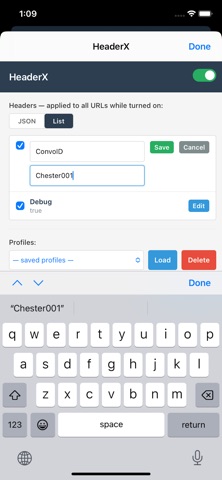
Toolbar status at a glance Extension icon shows a green badge with the number of active headers when HeaderX is on Icon switches to an active (green) state when enabled; clears when off Smarter profiles Profiles use a single searchable field — type to find or create a profile name Selecting a saved profile loads its headers and applies them automatically (no Load button) Apply updates live header injection; Save (icon) persists the current headers to the profile Compact save and delete icon buttons next to the profile field Warning before switching profiles if you have unsaved edits Confirmation before deleting a profile Header editing Edit individual headers inline in List view (toggle, edit name/value, save or cancel) Safari-specific Toolbar badge still updates when rules apply, even if profile storage write fails intermittently Non-standard headers still fall back to in-page injection for fetch/XHR when Safari rejects them via network rules
Audience growth
Ratings growth
Baseline captured. Growth appears after the crawler observes a changed rating count.
Momentum comes from crawler snapshots for the tracked storefront. “Viral growth signal” means unusually fast recent rating gains; it is an indicator, not download data.
Price tracking
Price intelligence
First snapshot captured. The trend line starts after the next crawler price observation.
- First observed Aug 19, 2026 · 10:55 AM Free
Screenshots