About this app
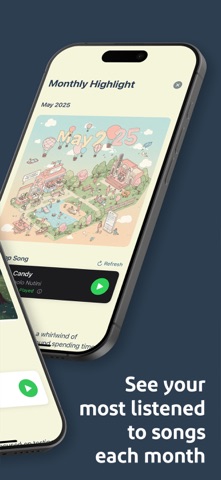
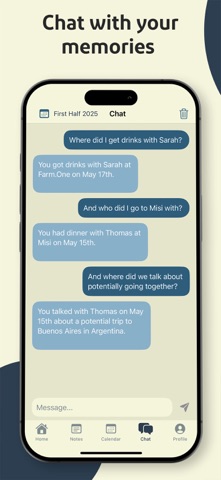
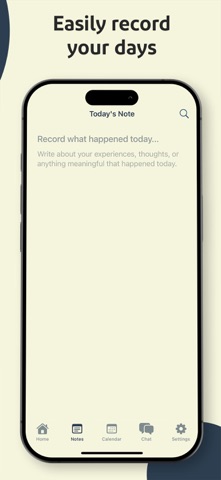
Highlight is made for looking back without turning your life into charts or endless lists. It helps you revisit everyday moments by placing photos, notes, events, and health data on a simple personal timeline. If remembering things feels harder than it should, this is an easy place to begin, open Highlight and start putting your days back together! People don’t forget moments because they didn’t matter. Most of the time, they forget because those moments are scattered. Photos here, notes somewhere else, events that pass and are gone. Putting them side by side changes how easy it is to remember. Opening a past day is more than flipping through photos. You start to see what was happening around that moment, where you were, what you noted, how the day actually felt. Sometimes a small detail brings everything back. Other times, you notice patterns you hadn’t really thought about before. Your Life - Day by Day Instead of leaving photos, events, and notes scattered, Highlight places them next to each other for each day, week, or month. When days blend together, this makes it much easier to remember what actually happened and when. Weekly and Monthly Recaps Instead of long reports, Highlight creates simple summaries at the end of each week and month. They’re meant for quick reflection. A fast look back at busy weeks, trips, or periods when a lot was happening, without needing to write anything extra. Search Your Memories If you can’t remember exactly when something happened, that’s okay. You can search your notes naturally and find moments by asking simple questions. It saves time and avoids endless scrolling through old entries. Track What Matters - Your Way The daily rating is flexible. Some people use it to track mood. Others use it for productivity, habits, or progress on personal projects. There’s no right way to use it. Over time, those small inputs turn into a clear overview you can actually learn from. Your Memory Soundtrack If you connect your music, Highlight shows your most played song each month. It’s a small touch, but it often brings memories back faster than words do. Your Data, Your Control - Full Privacy Everything is stored in your own iCloud account. Highlight doesn’t see your information and never shares it. Your timeline stays personal, exactly as it should be. Highlight isn’t meant to take over your journal or treat life like a spreadsheet. It sits quietly in the background, helping you remember, reflect, and spot small details along the way. Over time, it grows into a simple record of how your life came together. Download our app today and begin creating a personal timeline that makes it easier to remember what really happened. See your moments come together, reflect on your days naturally, and keep a clear record of your life over time! --- Terms of Use: https://www.termsfeed.com/live/c50e838c-8397-4436-9171-6dc4586e3c7b
Latest release
What’s New
We fixed some small bugs and made the app easier to use. Enjoy!
Audience growth
Ratings growth
Baseline captured. Growth appears after the crawler observes a changed rating count.
Momentum comes from crawler snapshots for the tracked storefront. “Viral growth signal” means unusually fast recent rating gains; it is an indicator, not download data.
Price tracking
Price intelligence
First snapshot captured. The trend line starts after the next crawler price observation.
- First observed Aug 12, 2026 · 11:50 PM Free
Screenshots