About this app
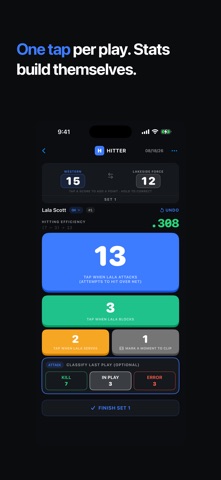
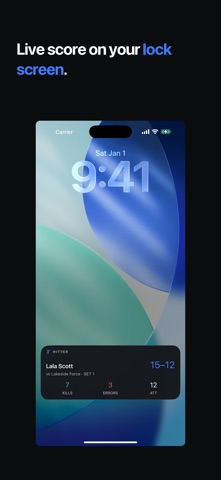
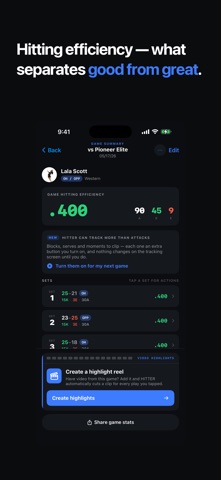
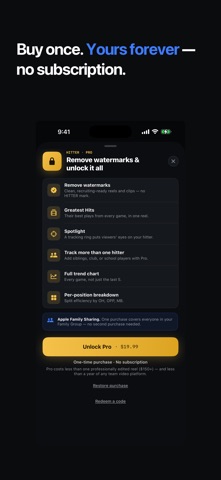
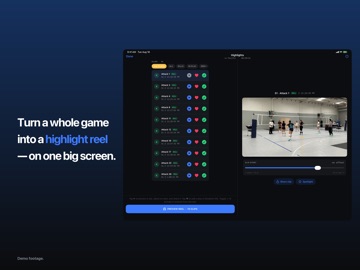
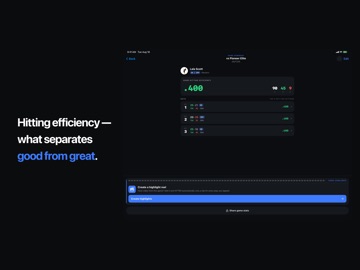
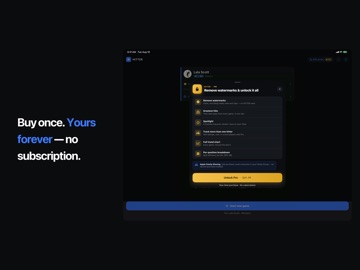
Track the game. Get the reel. HITTER is the fastest way to track volleyball hitting efficiency from the sideline, and the only app that automatically converts your own game footage into a highlight reel. You simply tap the screen once for each play while you watch the game. After the game finishes, the app generates a shareable reel, all on-device. No subscription. Built for outside, opposite, and middle hitters. One player at a time. HOW IT WORKS 1. Set up a tripod and record the game in landscape mode using the built-in Camera app on a second iPhone or iPad. 2. On your tracking device, tap the big button in the HITTER app each time your player attacks. HITTER computes hitting efficiency in real time. Optionally track blocks and serves too! 3. After the game, open HITTER on the device that recorded the video. Your tracking data syncs via your Apple account. The app links each play to the video and cuts a slick highlight reel. TRACK EVERY PLAY THAT SCORES You can record attacks with a single tap. You can also optionally track blocks and serves. Block points, aces, and errors will then appear in your stats and the highlight reel. These options are off by default to keep the tracking screen simple. Use the MARK button to save any moment, such as a dig or a long rally, without adding a statistic. VIDEO HIGHLIGHTS Create a highlight reel from your footage without using an editor or uploading files. HITTER clips every play you recorded and merges them into one video. The reel includes an intro & outro card, captions for each clip, and the player's name and number. You can preview clips, adjust timing, and set the clip length. Export options include landscape, vertical, or square formats for any feed. The Spotlight feature (Pro) visually highlights your athlete in the video. Creating reels requires two devices as described above. Tracking stats only needs one device. Free reels include a small HITTER watermark. The Pro version removes the watermark for clean, recruiting-ready reels. SHRINK GAME FILM Full game recordings use several gigabytes of storage. HITTER can reduce that to one small video that contains only the plays you want to keep. You can then delete the original recording; a 12 GB game file can be reduced to a few hundred megabytes. It's free, and you can continue to create and edit reels after the original file is deleted. GREATEST HITS You can favorite a player's best plays to build a reel that spans multiple games. Assemble these reels from all favorites or from a specific date range. (Pro) HAND OFF A WHOLE PLAYER You can send a HITTER Pack to your player. This file contains all stats and saved clips. They can open the file in HITTER on their own device to build and share their own reels. BUILT FOR iPad HITTER on iPad provides a big two-pane studio for building reels. You can view your clip list next to a large preview window. You can track on an iPhone and build the reel on an iPad using your private iCloud sync. REAL HITTING STATS Hitting efficiency is calculated as (Kills − Errors) ÷ Attacks. This metric rewards scoring and accounts for errors. The app performs the math automatically. - View live hitting efficiency for each set while tracking. - Review a game summary with per-set breakdowns. - Track yearly and all-time trends with splits for OH, OPP, and MB positions. YOU'RE IN CONTROL There are no cloud queues or annual bills. You track the plays and film the game on your own devices. Your statistics are stored in your private iCloud account. They sync across your devices and remain available if you delete the app. FREE TO START. PRO FOREVER. HITTER is free to download. The free version lets you track one player, shrink game film, and create watermarked reels. A one-time Pro purchase removes the watermark. Pro also includes Greatest Hits, Spotlight, unlimited players, trend charts, and per-position breakdowns. One purchase covers your household through Apple Family Sharing.
Latest release
What’s New
Past games now keep the team name and jersey number your player had at the time. Editing a player's team or number no longer relabels finished games' highlight reels.
Audience growth
Ratings growth
Baseline captured. Growth appears after the crawler observes a changed rating count.
Momentum comes from crawler snapshots for the tracked storefront. “Viral growth signal” means unusually fast recent rating gains; it is an indicator, not download data.
Price tracking
Price intelligence
First snapshot captured. The trend line starts after the next crawler price observation.
- First observed Sep 4, 2026 · 2:39 AM Free
Screenshots