About this app
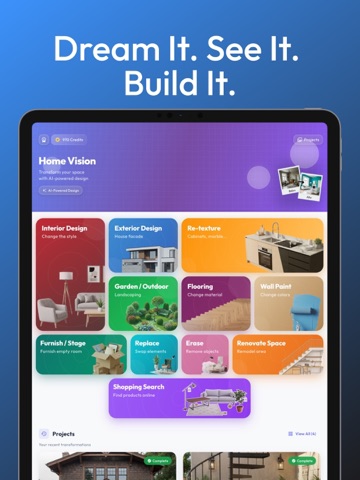
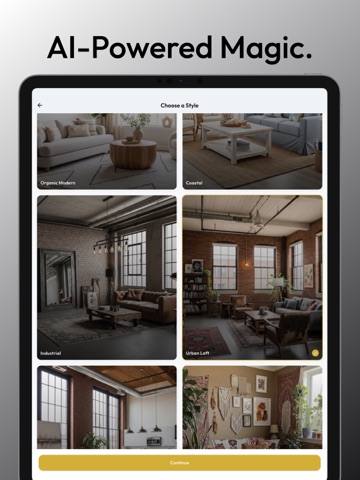
Turn your smartphone into a professional architect and interior designer. Whether you’re looking to renovate a single room, stage an empty house, or redesign your home’s entire exterior, Home Vision AI uses cutting-edge artificial intelligence to visualize your dreams in seconds. Simply snap a photo of your space and let our AI do the magic. No more guessing—see exactly how your home will look before you spend a penny on contractors or materials. ## One App, Every Design Need Home Vision AI offers a comprehensive suite of tools for homeowners, real estate agents, and interior design enthusiasts: Interior Design & Style Swap: Not sure if your living room should be Modern, Boho, or Industrial? Upload a photo and instantly swap styles to find the perfect vibe. Exterior & Facade Design: Boost your curb appeal! Change the facade of your house, update siding, or experiment with modern architectural elements. Garden & Outdoor Landscaping: Transform your backyard or patio. Add lush gardens, pathways, and outdoor furniture with our AI landscaping tool. Re-texture & Cabinetry: Deep-dive into kitchen and bathroom details. Change cabinet textures, marble countertops, and backsplash materials instantly. Virtual Staging (Furnish / Stage): Have an empty room? Use our AI to stage it with beautiful furniture that fits the scale and lighting of your photo. Perfect for real estate listings! Flooring & Wall Paint Visualizer: Switch between hardwood, tile, or carpet in a tap. Test any paint color on your walls without picking up a brush. Replace & Swap Elements: Want to see a new sofa or a different light fixture? Use the "Replace" tool to swap specific items in your room. AI Erase & Renovate: Remove clutter or unwanted objects from your photos with the Erase tool, then use "Renovate Space" to build your vision from scratch. ## Why Choose Home Vision AI? Real-Photo Visualization: We don’t use 3D models; we use your actual photos for 100% realistic results. Blazing Fast AI: Generate high-quality renderings in under 30 seconds. Project Management: Save all your designs in your "Projects" folder to compare styles or share with your contractor. User-Friendly: No technical or design skills required. If you can take a photo, you can design a home. ## Perfect For: Homeowners: Planning a DIY renovation or hiring a pro. Real Estate Agents: Virtually stage empty properties to sell faster. Interior Designers: Create quick mood boards and visualizations for clients. Architects: Visualize exterior facade changes instantly. Stop imagining and start seeing. Download Home Vision AI today and build your dream space! "Terms of Use: https://www.apple.com/legal/internet-services/itunes/dev/stdeula/"
Latest release
What’s New
* Now, you can transform your cabinets, countertops, doors, tables, carpets, and much more!!! * You can replace a selected furniture with any object using photo upload! * You can create, edit, and preview your own materials! * New objects and textures! * Model Performance Improvements!
Audience growth
Ratings growth
Baseline captured. Growth appears after the crawler observes a changed rating count.
Momentum comes from crawler snapshots for the tracked storefront. “Viral growth signal” means unusually fast recent rating gains; it is an indicator, not download data.
Price tracking
Price intelligence
First snapshot captured. The trend line starts after the next crawler price observation.
- First observed Sep 6, 2026 · 2:13 PM Free
Screenshots