About this app
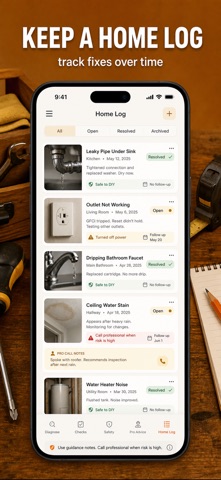
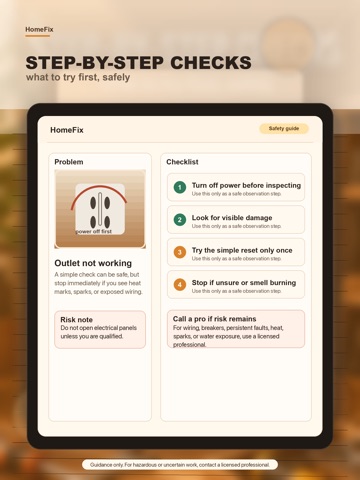
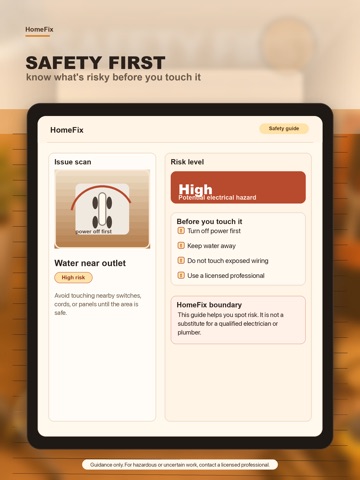
HomeFix helps you triage common home repair issues with a confidence-rated AI diagnosis, a dedicated Safety screen, and an interactive step-by-step checklist — so you can make an informed decision before touching anything. Not sure if it is even worth attempting? The Safety screen shows your risk level upfront, with clear do-not-touch warnings and a "call a professional" trigger list. Free download lets you scan the diagnosis and Safety notes straight away. Unlock the full repair plan, step checklist, cost comparison, and repair log with a Premium subscription (auto-renewable) or Lifetime unlock; pricing and options are shown in the App Store. AI DIAGNOSIS WITH CONFIDENCE RATING • Snap a photo of the problem area, appliance, or error code, or describe the symptom • AI ranks probable root causes by likelihood • Confidence indicator — high, medium, or low — shown on every result • Uncertainty notes flag where more information is needed DEDICATED SAFETY SCREEN • Risk gauge for every diagnosis: Safe / Caution / Danger • Do-Not-Touch warnings for gas, high-voltage, and refrigerant work • Protective gear checklist before you start • "Call a professional if…" list — clearly tells you when to stop • This is guidance, not a guarantee. For complex or risky issues, consult a licensed professional. INTERACTIVE REPAIR CHECKLIST • Numbered steps with tap-to-check progress tracker • Difficulty: Easy / Moderate / Challenging • Estimated repair time for each task • Safety callouts highlighted at every critical step TOOLS & PARTS • Exact tool and part list — nothing unnecessary • Estimated parts cost with purchasing suggestions • Part numbers for fast ordering when available • Required vs optional clearly labeled COST COMPARISON: DIY vs PROFESSIONAL • Estimated DIY parts cost at a glance • Compare against typical professional service ranges • Clear guidance on when calling a pro is the right call HOME REPAIR LOG • Save every diagnosis with photo, status, and follow-up date • Filter by Open / Resolved / Archived • Track your home repair and maintenance history over time • Revisit past diagnoses when a problem recurs COMMON HOME AREAS • Washing machines & dryers • Refrigerators & freezers • Dishwashers • Air conditioners & HVAC • Water heaters • Leaks, outlets, and visible home repair issues • Ovens & ranges • More added regularly PRIVACY • No account required • Repair history saved on your device • AI diagnosis requires an internet connection Terms of Use: https://www.apple.com/legal/internet-services/itunes/dev/stdeula/ Privacy Policy: https://homefix.skybringup.com/privacy/
Latest release
What’s New
Rebuilt with a warm amber workshop design, a new dedicated Safety tab with risk gauge and do-not-touch warnings, interactive step checklists with progress tracking, and a Home Log with Open/Resolved/Archived status — plus clearer guidance-not-guarantee messaging throughout.
Audience growth
Ratings growth
Baseline captured. Growth appears after the crawler observes a changed rating count.
Momentum comes from crawler snapshots for the tracked storefront. “Viral growth signal” means unusually fast recent rating gains; it is an indicator, not download data.
Price tracking
Price intelligence
First snapshot captured. The trend line starts after the next crawler price observation.
- First observed Aug 17, 2026 · 7:44 PM Free
Screenshots