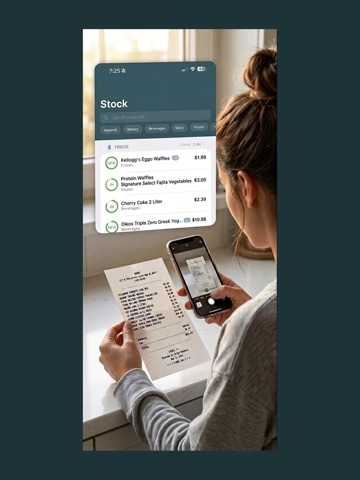
About this app
HomStock transforms grocery receipts into a living home inventory. Snap a photo, and it reads every item, sorts it into Fridge, Pantry, Frozen, and more, automatically building your stock. With "Plan My Week," effortlessly plan a full week of dinners from your pantry and shopping list, with cooking steps and real cost previews based on your receipts. No manual entry. No spreadsheets. KEY FEATURES• Scan Receipts Instantly Point your camera at any receipt. HomStock recognizes each item and files it under the right category in seconds. • Track Your Home Inventory See everything you have at a glance. Items show how recently they were added so you know what's fresh and what's about to run out. Search by name or filter by category. • Smart Shopping Lists Build a list from items running low, or add anything manually. HomStock learns what your household actually uses so your list stays relevant week after week. • Know What You Spend A clean monthly dashboard breaks down every dollar by category. See exactly how much went to Produce, Dairy, Personal Care, or anything else — and watch your average trip cost over time. • Built for Real Households Whether it's just you or a family of five, HomStock makes sure no one buys the same gallon of milk twice. Everything lives in one place, organized the way you actually shop. PERFECT FOR • Anyone tired of throwing out expired food • Households trying to stick to a grocery budget • People who love systems but hate data entry • Anyone who has stood in a store wondering, "do we already have this?" PRIVACY FIRST Your receipts, your data. HomStock keeps your information on your device and syncs privately through iCloud — no cloud account, no sign-up, no tracking, and your shopping habits are never sold or shared. START IN UNDER A MINUTE Open the app, scan your last receipt, and watch your home inventory build itself. That's it. Terms of Use: https://www.apple.com/legal/internet-services/itunes/dev/stdeula/
Latest release
What’s New
Receipt scanning holds its place now. • A scan interrupted by closing the app comes back instead of disappearing • Adding more pages to a long receipt keeps the photos you already took • A receipt whose total couldn't be read is flagged rather than quietly saved • Undo tells you when it didn't work, so nothing looks saved that isn't • Tapping a scan notification opens the receipt it's about • A scan you've dismissed or retried stays dismissed — its alert no longer comes back every time you reopen the app Every screen in the scan flow — the review sheet, the page limit, the notifications — is now translated, not English with a translated shell around it.
Audience growth
Ratings growth
Baseline captured. Growth appears after the crawler observes a changed rating count.
Momentum comes from crawler snapshots for the tracked storefront. “Viral growth signal” means unusually fast recent rating gains; it is an indicator, not download data.
Price tracking
Price intelligence
First snapshot captured. The trend line starts after the next crawler price observation.
- First observed Sep 14, 2026 · 6:25 PM Free
Screenshots