About this app
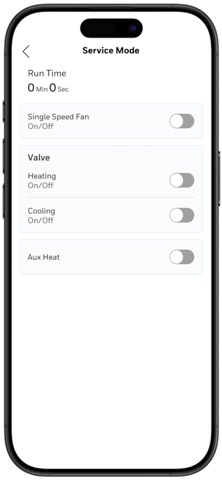
Configure Thermostats faster. Balance VAVs smarter. Built for enterprise teams, Honeywell Connect Mobile turns your phone into a field-ready HMI. Technicians can configure Thermostats in minutes, balance VAVs (Variable Air Volume) more safely. Result - less time on site, minimizing ladder trips, fewer errors, and smoother handovers. Thermostat Configuration Out-of-the-box direct Wi-Fi – Connect to TC300 series directly with no extra hardware/setup. Guided workflows – Intuitive flow with step-by-step device & equipment configuration. Wiring drawings - Clear visuals to install right the first time. Push/Apply configurations - Send device & equipment settings to the thermostat over direct Wi-Fi. Templates - Replicate proven configuration across similar devices in minutes. Service mode - Test and check out IOs on the spot. Read-back & sync - Pull configuration from the thermostat to sync, verify and edit. At-a-glance status - View device info and operating status of thermostat. VAV Balancing Out-of-the-box BLE - Connect to VAV controllers with no pairing hassle. Network discovery - Find devices over BACnet/IP or MS/TP networks. Zero & flow calibration - Support for common applications (Cooling with reheat, Fan-powered, etc.). Multi-device workflows: Calibrate multiple VAVs simultaneously to accelerate commissioning. Group & individual commands: Move dampers, run calibrations, verify results in real time. Safer, faster work: Minimize ladder trips by driving tests from the app. Digital balancing report: Auto-capture, generate and share balancing reports for customer sign-off.
Latest release
What’s New
Portuguese language support and optimization.
Audience growth
Ratings growth
Baseline captured. Growth appears after the crawler observes a changed rating count.
Momentum comes from crawler snapshots for the tracked storefront. “Viral growth signal” means unusually fast recent rating gains; it is an indicator, not download data.
Price tracking
Price intelligence
First snapshot captured. The trend line starts after the next crawler price observation.
- First observed Aug 13, 2026 · 3:56 AM Free
Screenshots