About this app
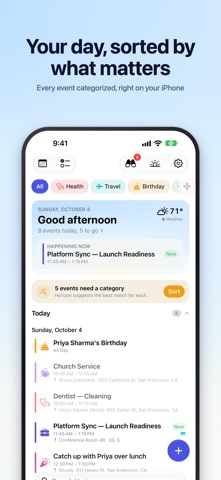
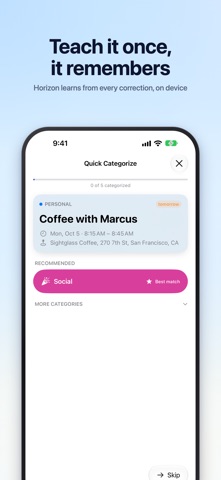
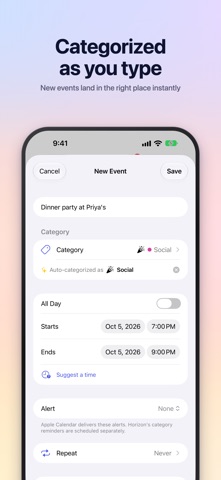
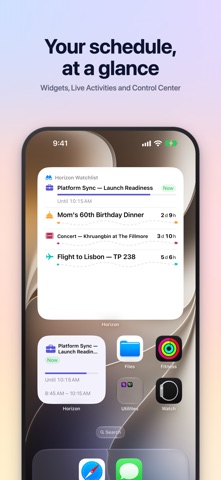
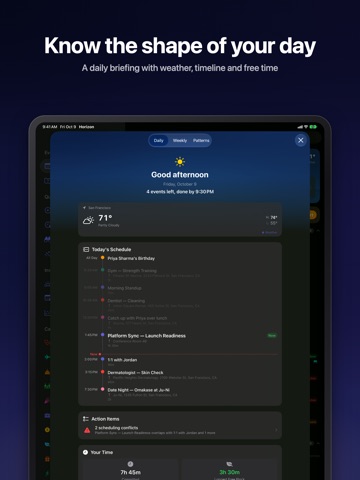
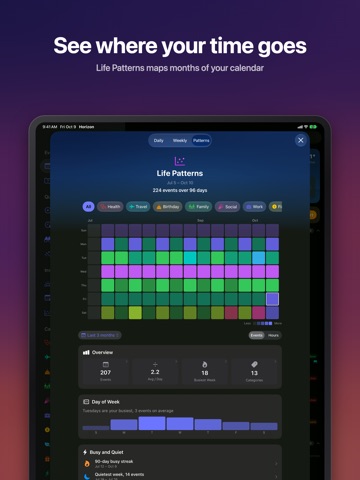
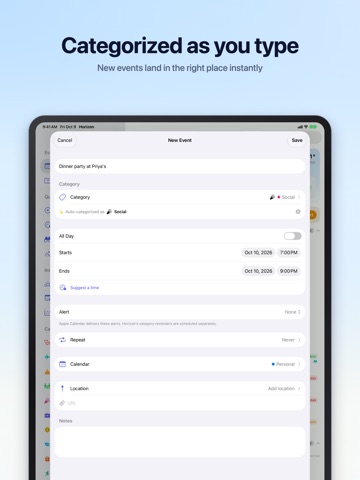
Your Apple Calendar, organized by what matters. Horizon is a companion for Apple Calendar. It reads the events you already have, sorts them into categories like Work, Health, Family and Travel, and brings the important ones forward: on a dashboard, in daily and weekly briefings, on your Lock Screen, in widgets and through Siri. There's no new calendar to keep up and no account to create. Grant calendar access and Horizon does the rest, on your device. SMART CATEGORIES Horizon sorts every event into one of 19 categories using on-device intelligence, and learns from each correction you make. Add your own categories and keywords (Horizon shows which events a keyword will match before you save it), or change any event's category with a tap. Quick Categorize deals out the rest as cards, with your best matches ready as buttons. A DASHBOARD THAT STARTS WITH TODAY The Today card shows the date, the weather and what's happening now or next. Browse by category, or switch to the month view, where each day carries a color bar of what's on it. Multi-day trips appear on every day they cover. DAILY & WEEKLY BRIEFINGS The daily briefing gives you the shape of your day: how much is on, when it starts, when you're done and where your free time is. The weekly briefing covers your busiest days, highlights, how your time splits across categories, and every scheduling conflict. Life Patterns looks back over months to show where your time really goes. WATCHLIST Count down to what you're looking forward to: a trip, a birthday, a concert. A watched event gets a Live Activity on your Lock Screen and in the Dynamic Island, milestone notifications a month, a week and a day out, and its own widget. Watch a recurring event and the countdown moves on to the next one by itself. FIND FREE TIME Need an hour for the gym or coffee with a friend? Horizon scans your schedule within the hours you choose and suggests the best open slots. Tap one to create the event. SIRI, SHORTCUTS & FOCUS Ask "What's on my Horizon today?" or "When am I free this week in Horizon?" Add an event, watch one or change its category by voice. Eight actions are ready in Shortcuts, Controls work in Control Center and on the Action button, and Focus filters show only the categories you choose while a Focus is on. WIDGETS Home Screen and Lock Screen widgets for your next event, today's briefing, the week ahead and your Watchlist. They stay current without opening the app. REMINDERS THAT FIT THE EVENT Set reminder timing per category: a week ahead for a trip, the morning of for a birthday, 30 minutes before a meeting. Horizon can skip events that already have a Calendar alert, so you're never reminded twice. DUPLICATES HANDLED The same meeting on your work and personal calendars shows up once in Horizon. BUILT ON APPLE CALENDAR Horizon works with every calendar in Apple Calendar: iCloud, Google, Exchange, Outlook and CalDAV accounts added to your device. Create events in Horizon with live categorization and Suggest a Time, and edit existing ones in Apple's own editor, with calendars, invitees, alerts and repeats. IPHONE, IPAD & APPLE WATCH A side-by-side layout on iPad, and your day and your Watchlist on Apple Watch. PRIVATE BY DESIGN Categorization runs entirely on your device. Your events are never sent to a server, and there are no Horizon accounts and no tracking. Your categories and settings sync between your devices through your own iCloud account.
Latest release
What’s New
What's New in 1.7 See your open time, and your week at a glance. Free time where you plan Tap the Free chip and Horizon shows the open time between your events, right in the list and the month view. Tap a gap to book it: the new event starts at the beginning of the gap, at the length you choose in Settings. Made for anyone who books appointments for a living. A week view Turn your iPhone sideways in the calendar to see the whole week on an hour grid. Choose a category and its events stand out in color while the rest of your week fades to grey, so you see where it fits. Tap an empty hour to add an event there. On iPad, switch between Week and Month in the calendar header. More room on your side In landscape the calendar takes the whole screen. New Event, Search, your Watchlist, briefings and Settings sit in the header. The month view now fills the screen too. Find Free Time, refreshed Results and search options have a cleaner look and follow your week's first day. On the timeline, the block follows your finger and snaps to the nearest 15 minutes, and the timeline has a side panel in landscape. Watchlist Countdowns to all-day events read in whole days. The trail lights up as you travel it, and a running event's card shows a sun crossing the sky. Suggestions favor trips and occasions over birthdays, and a Compact Rows option keeps a long list short. Smarter categorizing A calendar you've tagged with a category now counts for more: when an event's title could go either way, Horizon files it under the calendar's category and marks it for review instead of guessing. Apple Intelligence sorts uncategorized events faster and in larger batches, and skips the work in Low Power Mode. Quick Categorize shows one card per title. Life Patterns counts start times Beside Events and Hours there's now Times: how many different moments your day starts something. Six events at noon, noon, 1pm, 3pm, 6pm and 6pm make four. Everything on the screen follows the switch. Life Patterns, by time of day and by title New cards show when your day happens and what keeps coming back. Time of Day charts your starts by hour, how much of each hour is usually booked, or the minute of the hour you start on, and opens into a weekday grid. Most Often lists the titles you see again and again, with a week-by-week strip and their usual start. Days by Load, Day's Span, Between Starts and Mix round out the picture, and the Overview gains a week-by-week line. Filter by a category and every card follows, so a Meals category reads as a food log. Little touches Pull to refresh is centered and looks the same on the dashboard, the briefings and Life Patterns, and a pull on any of them syncs your calendars. While Horizon sorts your events for the first time, calendar facts keep you company. Fixes - Quick Categorize can change a whole series from an Outlook or Exchange calendar - The CarPlay Live Activity shows the event's title again - Recategorize All counts only events you can see as still uncategorized - The Watchlist badge no longer counts events that have ended - The landscape month view no longer stops two thirds of the way down the screen - Weekday names in Find Free Time follow your language - Choosing a long free slot opens the timeline on your event instead of above it - Life Patterns' lists and breakdowns no longer close on their own the first time you open one - Hide Declined Events now finds invitations you declined, wherever your address is known - Declined meetings no longer hold up your free time - On the days clocks change, the timeline puts events at the right hour - Widgets and the Watch say "Ended" once an event is over, instead of "Now" - Opening an event in another city no longer changes the weather on your Today card - Snoozing a reminder works when Horizon wasn't running - Editing a category's keywords keeps what Apple Intelligence filed If Horizon helps you plan your week, a rating on the App Store goes a long way. Thank you!
Audience growth
Ratings growth
Baseline captured. Growth appears after the crawler observes a changed rating count.
Momentum comes from crawler snapshots for the tracked storefront. “Viral growth signal” means unusually fast recent rating gains; it is an indicator, not download data.
Price tracking
Price intelligence
First snapshot captured. The trend line starts after the next crawler price observation.
- First observed Oct 11, 2026 · 7:43 PM Free
Screenshots