About this app
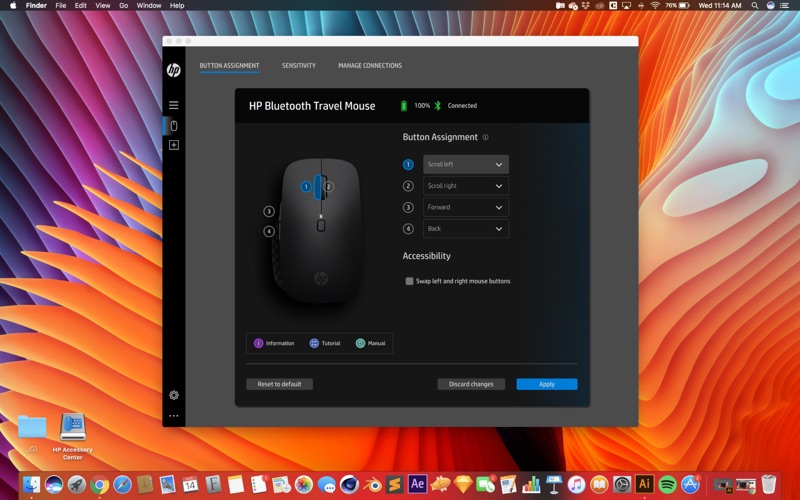
The HP Accessory Center (HPAC) allows you to tailor the settings of your supported HP accessories to suit your personal needs. Use the software to customize programmable buttons to help you quickly navigate to your favorite apps, websites, and daily task shortcuts, adjust cursor speed, verify pairing, and check battery status. Not all HP accessories are supported by HPAC. Please see your device specifications to check whether your device is supported by HPAC. NOTE: The HP 960/965 4K Streaming Webcam and HP 620/625 FHD Webcam are now supported by the Poly Lens app instead of HPAC. To download Poly Lens, go to www.poly.com/lens and scroll down and download the Desktop app for Windows. BUTTON ASSIGNMENT Customize the buttons on your supported HP accessory to make navigation quick and easy. Open a favorite application or execute shortcut key combos with a single click. BATTERY STATUS View battery status and customize when you get alerts for low battery. SENSITIVITY Adjust the speed and sensitivity of your supported mouse cursor. MANAGE CONNECTIONS View and manage all your supported HP accessory connections from a single dashboard. PRODUCT TUTORIAL View the highlights of your supported HP accessories and discover how to use product features.
Latest release
What’s New
---=== Device support added ===--- HP Tilt Ergonomic Mouse 720M/725M HP Multi-Device Dual-Mode Keyboard 490K HP Multi-Device Dual-Mode Keyboard 495K HP Multi-Device Dual-Mode Mouse 490M/495M HP Multi-Device Dual-Mode Keyboard with Palm Rest 580K HP Multi-Device Dual-Mode Keyboard with Palm Rest 585K HP Multi-Device Dual-Mode Mouse 580M/585M ---=== New Features ===--- General bug fixes and improvements
Audience growth
Ratings growth
Baseline captured. Growth appears after the crawler observes a changed rating count.
Momentum comes from crawler snapshots for the tracked storefront. “Viral growth signal” means unusually fast recent rating gains; it is an indicator, not download data.
Price tracking
Price intelligence
First snapshot captured. The trend line starts after the next crawler price observation.
- First observed Aug 10, 2026 · 6:05 PM Free
Screenshots