About this app
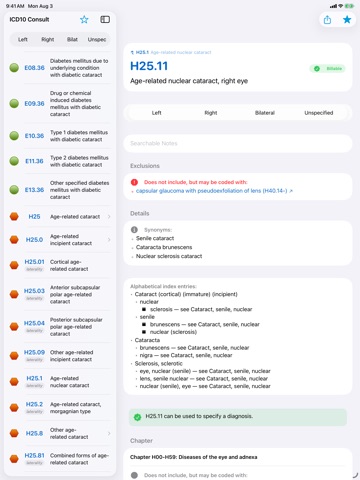
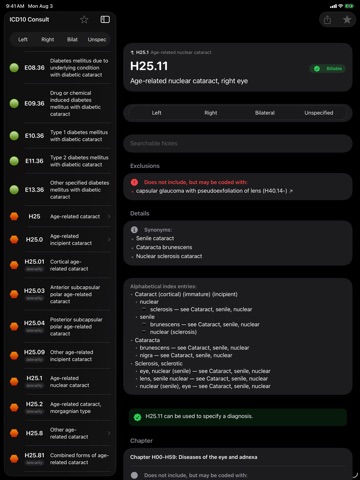
ICD10 Consult puts the most searchable, complete, current ICD10-CM resource at your fingertips. With flexible search that speaks your language, a deep understanding of the codes, customizable code notes integrated into your search results, and more, this is the resource you wish your EMR provided. With ICD10 Consult, you’ll never have to flip through a 30 pound book or go hunting for a coding reference page again... nor will you scratch your head wondering which 'magic word' is in the code's name. • Modern, fast interface designed for iOS 26 — with full iPad split view, hardware keyboard, Dynamic Type, and VoiceOver support • Deep code analysis allows easy handling of laterality, encounter, and staging codes, letting the app do the work of finding the perfect code • Add your own custom notes to any code which will appear seamlessly within search results • Tens of thousands of medical acronyms and synonyms are transparently cross-referenced to let you search using the terms you are used to; e.g. "MI" to "Myocardial Infarction" • Search term flexibility understands that, for example, 'vertebrae' matches 'vertebra' and 'ovarian' matches 'ovary' • ICD-10 tabular and alphabetical indexes integrated and simultaneously accessed to maximize results • Instant linkage within code descriptions • Coding guidelines as well as section and chapter instructions tightly integrated • Know at-a-glance if a code is valid for reimbursement or if more specificity is needed • Browse diagnoses by chapter, section and subsection; search within specific hierarchies • Favorites list allows quick access to your most common codes, with groups to organize them • Add custom, searchable notes on a per-code basis The current 2026 ICD10-CM codes were effective October 1, 2025. The app draws the complete code database directly from the data files available at the Centers for Medicare & Medicaid Services (CMS). ICD10 Consult is ad supported to provide you with the current, up-to-date codes. In-App Purchase is available to disable ads. There are no bait-and-switch limited features.
Latest release
What’s New
ICD10 Consult 12.0 is the biggest update in the app's history — a ground-up rewrite for iOS 26, with the smartest search the app has ever had. Search that thinks the way you do: • Type a side with a condition — "left cataract" automatically applies the Left filter and shows the side-specific codes • The official ICD-10-CM alphabetical index is built into search, including its cross-references — "abandonment" now finds the maltreatment codes • Mix codes and words ("E11 neuropathy"), search alternatives ("cataract OR glaucoma"), or type everyday phrases ("adult and child abuse") — they all just work • Thousands of code titles that previously slipped past search (like "…head, face and neck") are now found reliably • Searching a condition also surfaces codes whose coding instructions reference it, from their code-first and use-additional-code notes • Better ordering: exact title matches lead, related references follow Richer code details: • Every code lists its complete alphabetical-index entries, including "see …" cross-references • Official CMS short titles shown alongside the full descriptions • The WHO visual-impairment severity table, rendered right on the legal-blindness codes And the rewrite itself: • All-new interface built on Apple's latest technologies, with Liquid Glass design throughout • Redesigned code detail view: color-coded sections, clearer 7th-character tables, and at-a-glance billable status • Full iPad experience with sidebar navigation and split view, plus hardware keyboard and trackpad support • Comprehensive Dynamic Type and VoiceOver support • The complete 2026 ICD-10-CM code set (effective October 1, 2025) • Your favorites, notes, and ad-free upgrade carry over automatically ICD10 Consult 12.0 requires iOS 26.
Audience growth
Ratings growth
Baseline captured. Growth appears after the crawler observes a changed rating count.
Momentum comes from crawler snapshots for the tracked storefront. “Viral growth signal” means unusually fast recent rating gains; it is an indicator, not download data.
Price tracking
Price intelligence
First snapshot captured. The trend line starts after the next crawler price observation.
- First observed Aug 14, 2026 · 12:03 AM Free
Screenshots