About this app
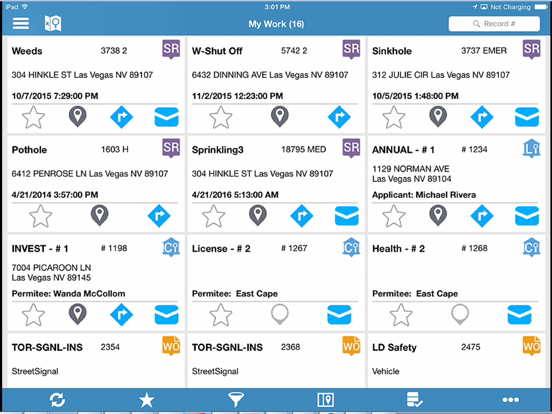
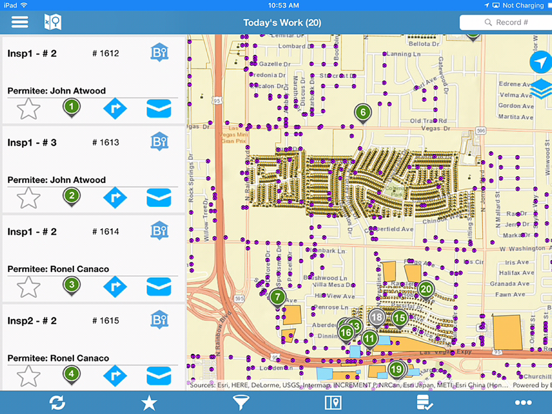
Infor Field Inspector allows government inspectors and technicians to access their assigned work information from the field. Inspection results, project completion costs and status are updated immediately or synchronized at a later time if network connectivity is unavailable. Content can be modified through configuration. Designed to work with Infor Operations and Regulations application, field staff can quickly and efficiently perform the following: • Download, view, and edit their assigned permitting inspections, service requests, work orders and asset inspections • Add comments and log entries • Take and attach photos • Issue inspection based code violations • Add multiple types of usage costs to work orders and service requests • Add observations and sample units to asset inspections • View and modify agency specific detail information • Print reports • Create new service requests, CDR inspections, work orders, case records, and asset inspections • Lookup assets and addresses from the map • Access and edit asset specific details • Work disconnected or connected • Display your own GIS data • Assigned work items display as an optimized routing list • Send notifications Note: By downloading this mobile application, you acknowledge to reading and agreeing to the corresponding end user license agreement.
Latest release
What’s New
Key improvements to Infor Field Inspector: • Sync & Stability: Fixed issues preventing full sync/resync after updates, and crashes on Pending Changes and Inspection Details. • My Work: Resolved blank query results. • Application Details: Fixed discrepancies between O&R and Field Inspector detail pages. These updates improve reliability and efficiency for field inspections. Thank you for using Infor Field Inspector. Details: https://customerportal.infor.com/csmcore?id=kb_article_view&sysparm_article=KB2039428
Audience growth
Ratings growth
Baseline captured. Growth appears after the crawler observes a changed rating count.
Momentum comes from crawler snapshots for the tracked storefront. “Viral growth signal” means unusually fast recent rating gains; it is an indicator, not download data.
Price tracking
Price intelligence
First snapshot captured. The trend line starts after the next crawler price observation.
- First observed Aug 21, 2026 · 1:39 PM Free
Screenshots