About this app
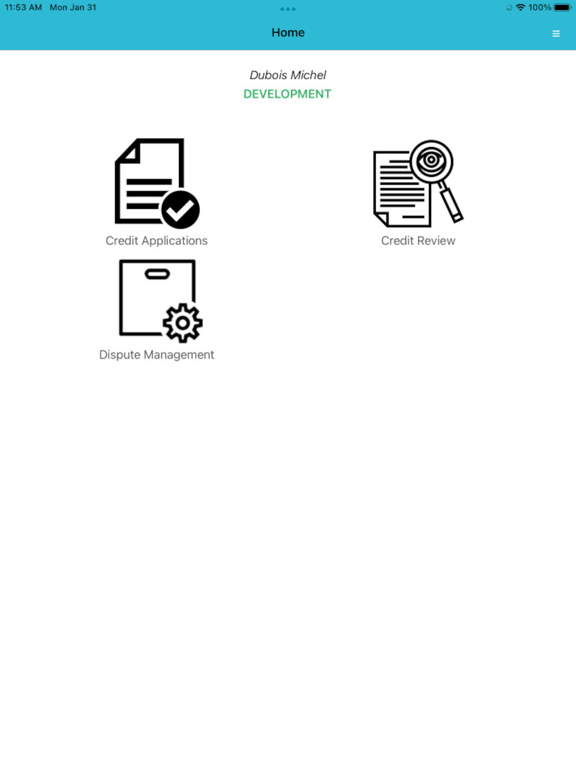
From a single app, you can use Intellimind for multiple companies, in multiple countries, in multiple languages. Once you log in you can see the main menu with three sections: Credit Applications, Dispute Management and Credit Review. In the Credit Applications section you have 3 dashboards: New credit request, Pending and Decided. In the first one, you can create a new credit application. In the second, you can view what applications are waiting to be validated. In the third, you can see which ones were validated – either accepted or refused. In the Dispute Management section you have 3 dashboards: Customer Search, Work In Progress(WiP) and Bl without References. In "Customer Search" you can search a customer by different filters, from "Wip Disputes" you can check for disputes in the list of disputes and on the last one you can see a list of invoices for different customers. In the Credit Review section you also have 3 dashboards: To validate, Pending and Decided. In “To validate” you can either accept or refuse requests. The other two dashboards are the same as in the previous section.
Latest release
What’s New
Psswords flow update
Audience growth
Ratings growth
Baseline captured. Growth appears after the crawler observes a changed rating count.
Momentum comes from crawler snapshots for the tracked storefront. “Viral growth signal” means unusually fast recent rating gains; it is an indicator, not download data.
Price tracking
Price intelligence
First snapshot captured. The trend line starts after the next crawler price observation.
- First observed Aug 23, 2026 · 10:56 AM Free
Screenshots