About this app
iPreFlight Genesis™, the next generation of iPreFlight, integrates flight planning, takeoff/landing performance limitations, and manufacturers’ weight and balance requirements with only minimal user input required. The flight planning element uses manufacturers’ operational data, in conjunction with current forecast weather conditions, to calculate the fuel required for the flight. The fuel calculation includes fuel burn (optimized for minimum fuel or time), and fuel for reserves, alternates, and holding. Along with runway analysis (RWA), weight and balance (WB), and flight planning, Genesis allows the user to prepare a trip book containing all textual and graphic weather products for the planned flight. The trip may be created days in advance of the flight, stored on the iPad, and can be automatically updated as products are revised. Or if needed, Genesis can create flight plans without an internet connection by using historical weather information, and then can be updated when internet is available. Approaching departure time, the user can easily prepare a flight release, consolidating RWA, WB, flight planning, and weather products. The flight release can be emailed, stored on an iPad, and/or shared with other flight deck crew members.
Latest release
What’s New
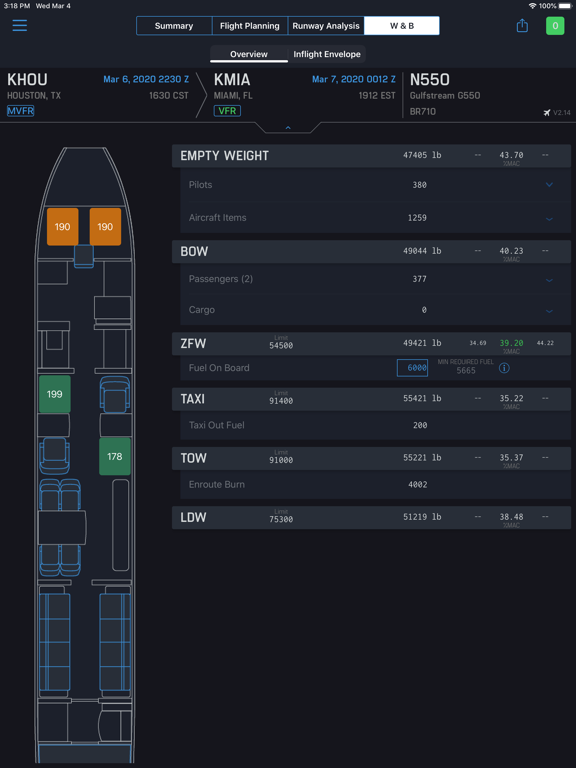
We're pleased to announce our new release, which introduces two enhancements to Weight & Balance that provide greater convenience and speed when building a flight. Crew Seating Flexibility: You can now assign crew members to any passenger seat. Their weight is accounted for under Basic Operating Weight (BOW) rather than Zero Fuel Weight (ZFW), keeping your W&B calculations accurate no matter where crew are seated. If crew is assigned using the “Non-op Crew” option, then their weight remains added to ZFW; these crew are indicated with a purple seat in the floor plan and “Non-op” label in the right-side passenger list. Automatic Baggage Handling: When enabled, adding a passenger automatically places a pre-set baggage weight into the first available cargo area with sufficient capacity. Removing a passenger removes the associated baggage in reverse order. Automatic baggage removal can be toggled off directly within the W&B screen whenever you need finer control. For compliance and training managers: the Crew Seating Flexibility feature changes how crew weight is classified in W&B (BOW vs. ZFW). Automatic Baggage Handling is optional and off by default, with no change to existing workflows unless enabled. We appreciate your continued support and welcome any feedback for future improvements. Thank you for choosing Genesis as your trusted flight planning software solution. Safe flying!
Audience growth
Ratings growth
Baseline captured. Growth appears after the crawler observes a changed rating count.
Momentum comes from crawler snapshots for the tracked storefront. “Viral growth signal” means unusually fast recent rating gains; it is an indicator, not download data.
Price tracking
Price intelligence
First snapshot captured. The trend line starts after the next crawler price observation.
- First observed Aug 20, 2026 · 10:03 PM Free
Screenshots