About this app
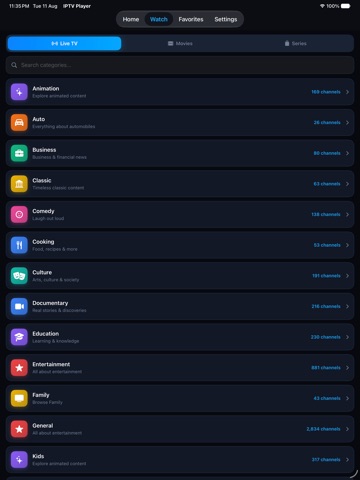
IPTV Player is a powerful IPTV streaming player for iPhone and iPad, built to help you watch your own IPTV playlists in a smooth, simple, and modern way. Add your M3U playlist URL, M3U8 link, or Xtream Codes credentials from your IPTV provider and enjoy Live TV, Movies, Series, and more in one clean app. FEATURES M3U & M3U8 Playlist Support Add IPTV playlists using a URL or import your playlist locally. Keep your channel list organized and easy to access anytime. Xtream Codes API Support Log in with your provider portal address, username, and password to load Live TV, Movies, and Series quickly without manually importing files. Electronic Program Guide XMLTV EPG support helps you see what is currently playing and what is coming next with a clean and easy-to-read TV guide layout. Live TV, Movies & Series Browse separate sections for Live channels, Movies, and Series. Categories are automatically detected from your playlist for faster navigation. Designed for iPhone & iPad Enjoy a smooth IPTV viewing experience optimized for touch controls, mobile screens, and tablet layouts. The app is simple, fast, and easy to use. High-Quality Streaming Watch supported streams in HD, Full HD, 4K, HDR, and high-bitrate quality whenever your IPTV provider and device support it. Favorites & Categories Save your favorite channels, movies, and series for quick access. Filter content by group or category to find what you want faster. Smart Search Search across channels, movies, and series from one place without switching between sections. Continue Watching Resume movies and series episodes from where you left off, so you can continue your entertainment without starting again. Multiple Playlists Add and switch between multiple IPTV playlists or provider accounts while keeping your viewing setup organized. Parental Controls Use passcode protection to help manage access to playlists, channels, or selected content. HOW TO GET STARTED 1. Get an IPTV subscription or playlist from a provider of your choice. 2. Open IPTV Player on your iPhone or iPad. 3. Add your M3U playlist URL, M3U8 link, or Xtream Codes login details. 4. Your Live TV channels, Movies, and Series will load automatically. 5. Start watching your own IPTV content anytime. DISCLAIMER AND LEGAL NOTICE IPTV Player is a media player application only. The app does not provide, host, distribute, sell, or make available any television channels, live streams, video-on-demand content, movies, series, playlists, or any other media. All content accessed through this app is provided solely by the user through their own externally obtained IPTV playlists, M3U links, M3U8 links, or Xtream Codes credentials. Users are fully responsible for ensuring that the content they stream is legally obtained and that their use complies with all applicable laws in their country or region. The developer does not endorse, promote, or support the use of unauthorized, pirated, or copyright-infringing streams. This app has no affiliation with any third-party IPTV provider, broadcaster, content distributor, streaming service, or media company. Any questions about content availability, channel quality, stream issues, or IPTV subscriptions must be directed to your own IPTV service provider. Premium features do not unlock, include, or provide any channels, playlists, subscriptions, movies, series, or broadcaster content. No in-app purchase is connected to any third-party IPTV service or content provider. For support, please use the developer contact link on this App Store page. Privacy Policy: https://habbithubdevelopers.com Terms of Use: https://habbithubdevelopers.com
Latest release
What’s New
• Enhanced UI for a cleaner and smoother experience • Improved app performance and stability • Fixed bugs and made minor improvements
Audience growth
Ratings growth
Baseline captured. Growth appears after the crawler observes a changed rating count.
Momentum comes from crawler snapshots for the tracked storefront. “Viral growth signal” means unusually fast recent rating gains; it is an indicator, not download data.
Price tracking
Price intelligence
First snapshot captured. The trend line starts after the next crawler price observation.
- First observed Sep 6, 2026 · 12:55 AM Free
Screenshots