About this app
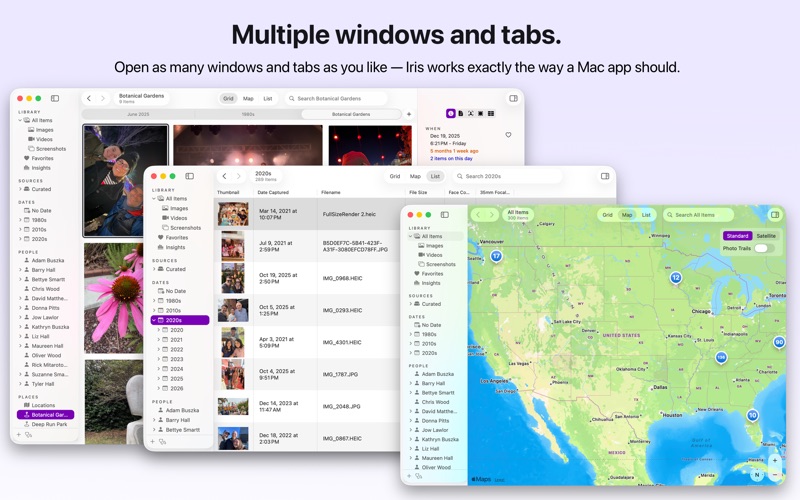
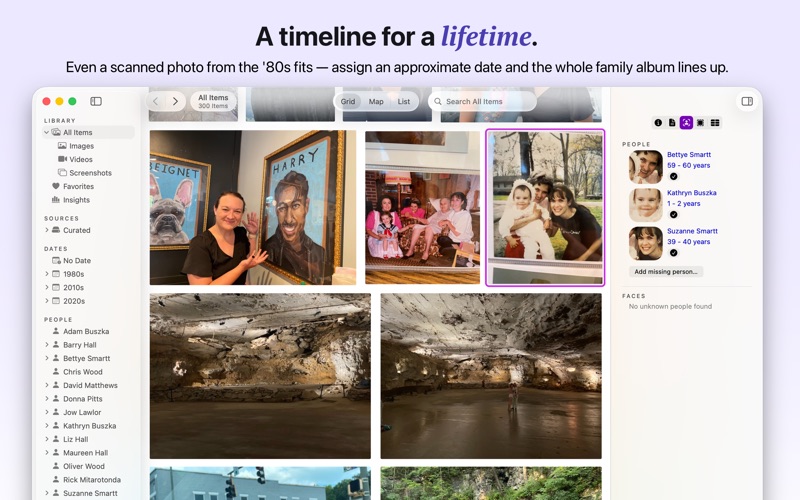
Your photos, fully yours. Iris is the native Mac photo library that helps you find, explore, and rediscover the people, places, and moments you love — privately, on your own computer, with the smarts of a cloud service and none of the cost. Photos used to live on your Mac. With Iris, they still do. Iris reads from the folders, external drives, or Photos library you already have, builds a fast, intelligent library on your Mac, and leaves your originals exactly where you put them. No cloud. No accounts. No subscription. Your memories are yours. Iris is for people who love their photos — family historians, archivists, and anyone who believes their library is worth keeping in a private, future-proof form that will outlive their grandchildren. FIND YOUR PEOPLE Iris recognizes the people in your photos using on-device machine learning — no face ever leaves your Mac. Browse by age, search by name, and watch your kids grow up. See how old everyone was the day a photo was taken, and let birthdays surface the people you love from years past. FIND YOUR PLACES Plot every photo on a map and rediscover where you've been. Jump to nearby photos, bookmark your favorite locations, and use Photo Trails to retrace your hikes, road trips, and favorite spots. FIND YOUR MOMENTS Modern cameras give you exact dates. A scanned photo from the 1980s doesn't. Iris lets you assign an approximate month, year, or decade when you don't know exactly when — so your whole family album fits inside a single timeline. MORE THAN A SEARCH BOX Search, sort, and filter by any criteria. Iris extracts the text from your photos — signs, menus, receipts, handwriting — and transcribes the speech in your videos, then makes it all instantly searchable with a fast, powerful UI that uncovers the needle in your haystack. YOUR PHOTOGRAPHY, BY THE NUMBERS Iris turns your library into a window on your life with rich stats — how many photos you take, when you take them, the cameras you use, and the people and places that show up most. BUILT LIKE A REAL MAC APP • Open as many windows and tabs as you like • List view: a fast, sortable table with configurable columns for date, camera, lens, location, file size, and dozens more • Quick switcher — hit Command-K to jump anywhere in your library • Select and copy the text straight out of your photos • Surprise Me! puts your whole library on shuffle to rediscover forgotten favorites • Share slideshows over FaceTime to gather everyone around the photos • A built-in MCP server lets Claude and other AI tools search your library — locally, with your permission 100% PRIVATE BY DESIGN Iris never edits, moves, or renames your originals. There are no accounts and no cloud servers, and no data ever leaves your Mac without your permission. The library lives on your Mac. Your memories, on your computer. Full stop. No accounts, no servers, no sign-ups, no nonsense. Made with care, on a Mac, in Richmond, Virginia, by Retina Studio.
Latest release
What’s New
## New Features **On This Day** — A new "On This Day" node in the sidebar, just below "No Date," shows every photo and video taken on today's month and day across all the years in your library. The window title tells you which day you're looking at (for example, "On This Day: June 21"). **People groups** — People can now be organized into nested groups in the sidebar. Create, rename, and delete groups from the sidebar's context menu, drag people and groups between them, and add a person or a subgroup straight from a group's right-click menu. Selecting a group shows every photo of everyone in it, including people nested in subgroups. Great for creating families. **Copy an item to the clipboard** — Right-click any photo or video in the grid or list view and choose "Copy" to put its image on the clipboard, ready to paste into another app. If the original file isn't available, Iris copies the cached thumbnail instead; for videos, it copies the poster frame rather than the movie file. **Drag photos out of the inline viewer** — Dragging an item to Finder or another app now works from the inline viewer, matching the behavior already available in the grid and list views. **Overlay person names onto dragged photos** — A new preference (Settings → Special → "Overlay Names") overlays the names of the people in a photo onto copies you drag out of Iris. Names are drawn as black text on a white background, listed in the corner of the image, and include each person's age at the time the photo was taken when Iris knows their birthday. Your originals are never modified — only the dragged-out copy carries the labels. **Sidebar expansion is remembered** — Which sidebar sections you had expanded is now restored when you relaunch Iris. Because Iris can restore multiple windows and tabs, expansion state is saved per window rather than shared across all of them. ## Improvements - Right-clicking a person's face in the inspector now opens a context menu with Edit, plus Confirm or Reject depending on whether that face has already been confirmed. - The "Open Viewer" command in the Item menu now reads "Close Viewer" while the inline viewer is open. - The "Overlay Names" preference moved from the General preference pane (in beta versions of Iris) to the Special pane since this feature is still experimental. - Dragging a large photo out of Iris is faster and no longer stalls the interface. ## Bug Fixes - Fixed the most common crash reported on macOS Tahoe.
Audience growth
Ratings growth
Baseline captured. Growth appears after the crawler observes a changed rating count.
Momentum comes from crawler snapshots for the tracked storefront. “Viral growth signal” means unusually fast recent rating gains; it is an indicator, not download data.
Price tracking
Price intelligence
First snapshot captured. The trend line starts after the next crawler price observation.
- First observed Aug 18, 2026 · 1:36 PM $24.00
Screenshots