About this app
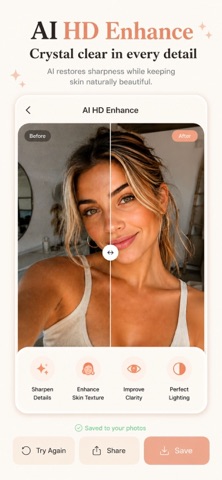
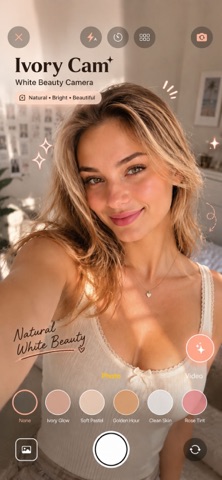
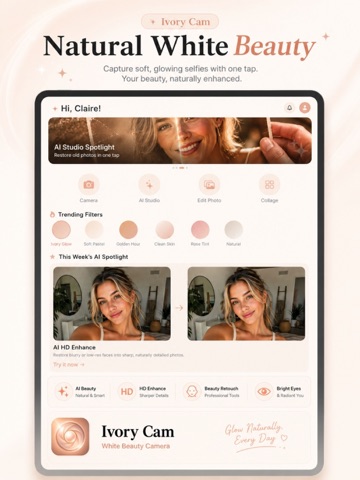
IvoryCam turns every selfie into a polished, magazine-ready photo — combining a real-time beauty camera, a full-featured photo editor, and 11 powerful AI tools in one elegant app. REAL-TIME BEAUTY CAMERA Shoot Photo or Video with live beauty adjustments applied before you even tap the shutter. Fine-tune 10 precision categories — Foundation, Lipstick, Blusher, Eyebrows, Eyeshadow, Eyeliner, Eyelash, Highlight, Shadow, and Pupil — each with natural, wearable tone options and adjustable intensity. Browse 12 curated filters (Ivory Glow, Soft Pastel, Golden Hour, Clean Skin, Rose Tint, Sunkissed, Cool Mist, Mocha, Velvet Rose, Champagne, Frost, and more), plus flash, timer, and grid controls for a complete shooting experience. PROFESSIONAL PHOTO EDITOR Perfect every shot afterward with a full editing suite: Adjust (brightness, contrast, saturation, warmth, vignette), Filters, Crop, Beauty retouching, Text overlays with multiple fonts and styles, Stickers, Draw, and decorative Frames — all with full undo/redo history. AI STUDIO — 11 CREATIVE TOOLS - AI HD Enhance — restore blurry or low-res faces into sharp, natural detail - Background Remover — precise, studio-style background removal - AI Portrait Upscaler — boost resolution while preserving real skin texture - AI Background Generator — describe a scene and swap in a brand-new background - AI Creative Avatar — generate a stylized avatar or background from text - AI Old Photo Restoration — bring faded or damaged old photos back to life - AI Style Filter — turn a selfie into anime, painting, or cartoon art - Smart Caption Generator — get a caption written to match your photo's mood - AI Auto-Enhance Analyzer — automatic lighting & composition retouch suggestions - AI Beauty Assistant — chat for skincare tips and styling advice - AI Prompt Assistant — get help writing better prompts for AI generation COLLAGE & GALLERY Build unlimited collages, organize photos into albums, and manage everything in a beautifully organized in-app Gallery. HOW TO USE 1. Open IvoryCam and grant camera access. 2. Choose Photo or Video mode, pick a filter, and adjust beauty settings live. 3. Capture, then refine your shot in the Editor with adjust, crop, text, stickers, and frames. 4. Visit AI Studio, select a tool, follow the on-screen consent step, and let AI do the rest. 5. Save your creation to Gallery or add it to a Collage. WHY IVORYCAM IvoryCam combines a natural-first beauty camera, a complete manual editor, and cutting-edge AI photo tools — replacing the need for multiple separate apps. Every tool is designed for realistic, flattering results rather than exaggerated effects. SUBSCRIPTION INFORMATION IvoryCam Premium unlocks full access to Camera, AI Studio, Editor, Collage, and Gallery. Plans available: - Weekly — $4.99 / week - Monthly — $6.99 / month (Most Popular) - Yearly — $49.99 / year (Best Value) An optional one-time AI Token Pack ($1.99, non-renewing) grants extra AI Studio credits for account holders who need more processing beyond their plan's allowance. - Payment will be charged to your Apple ID account at confirmation of purchase. - Subscriptions automatically renew unless auto-renew is turned off at least 24 hours before the end of the current period. - Your account will be charged for renewal within 24 hours prior to the end of the current period, at the same price you originally agreed to. - You can manage or cancel your subscription anytime in your Apple ID Account Settings after purchase; cancellation takes effect at the end of the current billing period, and no refund is issued for the unused portion. - Any unused portion of a free trial, if offered, is forfeited when you purchase a subscription. Privacy Policy: https://zenbytedev.blogspot.com/2026/01/privacy-policy.html Terms of Use (EULA): https://www.apple.com/legal/internet-services/itunes/dev/stdeula/
Latest release
What’s New
- Updated the in-app purchase system for improved stability - Bug fixes and performance improvements
Audience growth
Ratings growth
Baseline captured. Growth appears after the crawler observes a changed rating count.
Momentum comes from crawler snapshots for the tracked storefront. “Viral growth signal” means unusually fast recent rating gains; it is an indicator, not download data.
Price tracking
Price intelligence
First snapshot captured. The trend line starts after the next crawler price observation.
- First observed Aug 17, 2026 · 8:43 PM Free
Screenshots