About this app
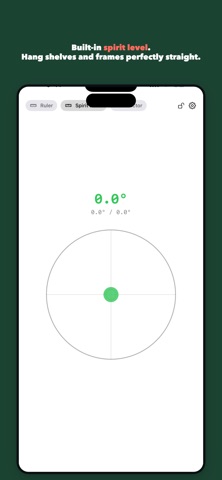
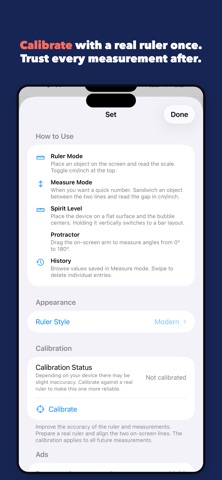
JustRuler turns your iPhone screen into a real-size ruler. When you forgot your tape measure but need a quick check on length, angle, or level, this is the one tool to keep handy. [Key features] - Real-size ruler mode — Place an object on the screen and read the scale. Toggle cm/inch instantly. - Two-line measure mode — Pinch an object between the on-screen lines and read the gap to the millimeter. - Protractor (0°–180°) — Drag the on-screen arm to measure angles. Great for DIY and furniture assembly. - Spirit level — Lay the device flat and the bubble centers. Hold it vertical for a bar-style level. - Calibration — Match your real ruler once and every measurement becomes more accurate. - 5 styles — Classic / Modern / Dark / Metal / Custom Color. [New in v2.1] - Sequential measurement: stack multiple segments and read the running total - Reference mode: set a target value and see the live diff against it - Voice readout: hear values spoken aloud when your hands are full - 31 languages supported [Who it's for] - DIY and craft enthusiasts - Anyone who doesn't want to carry a ruler around - Students, designers, makers Free with one launch interstitial ad. A one-time $0.99 purchase removes ads forever. Privacy Policy: https://kazusa703.github.io/privacy.html Terms of Use: https://kazusa703.github.io/terms.html Support: https://kazusa703.github.io/support.html
Latest release
What’s New
v2.1 update [New] - Sequential measure mode: add segments and read the total. - Reference mode: set a target via history or input; live diff with haptic + voice when matched. - Voice readout: speaks values as you drag and save, in your language. - 31 languages supported (was Japanese only). [Other] - Internal optimization and bug fixes. Please let us know what you think via Support.
Audience growth
Ratings growth
Baseline captured. Growth appears after the crawler observes a changed rating count.
Momentum comes from crawler snapshots for the tracked storefront. “Viral growth signal” means unusually fast recent rating gains; it is an indicator, not download data.
Price tracking
Price intelligence
First snapshot captured. The trend line starts after the next crawler price observation.
- First observed Aug 15, 2026 · 1:36 PM Free
Screenshots