About this app
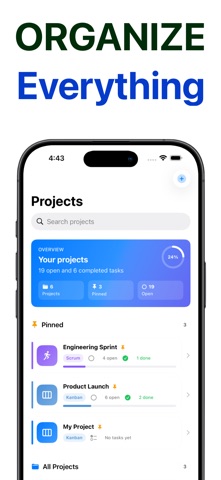
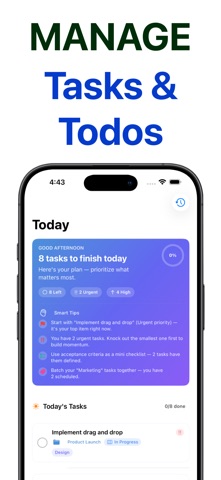
Kanban — flexible task and project management for iPhone and iPad. Organize work your way with Kanban, Scrum, Gantt, List, and Scrumban workflows. Plan your day, track progress on rich boards, and stay focused without unnecessary complexity. WORK THE WAY YOU WANT Choose the right workflow for every project: • Kanban — drag-and-drop boards with customizable columns • Scrum — sprints, backlog, and review stages • Gantt — timeline view for scheduled work • List — clean table-style task lists • Scrumban — flexible mix of Scrum and Kanban Pin important projects, customize board colors, and switch views as your work evolves. PLAN YOUR DAY The Today screen brings due tasks, priorities, and smart tips into one focused view. See what needs attention now and what can wait. APPLE INTELLIGENCE On supported devices, Kanban uses on-device Apple Intelligence: • AI Project Summary — instant insight into progress and next steps • Generate Tasks — turn an idea into a practical plan with due dates and columns Your data stays on your device. No account required. RICH TASK DETAIL Go beyond simple to-dos: • Subtasks and acceptance criteria • Priorities, tags, and story points • Due dates, reminders, and recurring tasks • Built-in time tracking • Photos, files, and PDF attachments STAY IN THE LOOP • Activity timeline — see what changed across projects • Per-task reminders and optional daily digest notifications • Search and smart lists • PDF export for project snapshots WORKS ACROSS YOUR APPLE DEVICES • Optional iCloud sync across iPhone and iPad • Home Screen widgets — Today and board at a glance • Apple Watch companion • Share extension — save into Kanban from other apps • Siri Shortcuts support PRIVATE BY DESIGN Tasks are stored on your device. iCloud sync is optional and uses your personal Apple ID. No sign-up, no data collection.
Latest release
What’s New
We have fixed issues related to icloud sync and other UI bugs. Thank you for feedback on this version Team Kanban board
Audience growth
Ratings growth
Baseline captured. Growth appears after the crawler observes a changed rating count.
Momentum comes from crawler snapshots for the tracked storefront. “Viral growth signal” means unusually fast recent rating gains; it is an indicator, not download data.
Price tracking
Price intelligence
First snapshot captured. The trend line starts after the next crawler price observation.
- First observed Aug 11, 2026 · 1:59 AM Free
Screenshots