About this app
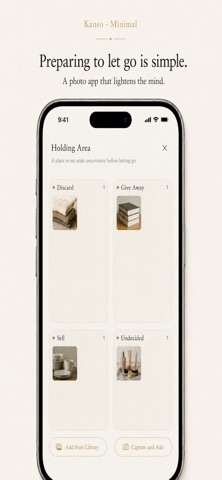
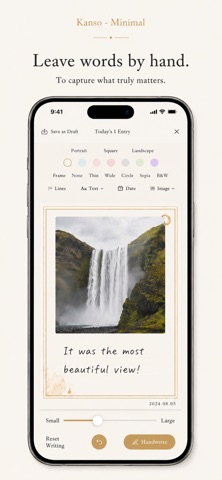
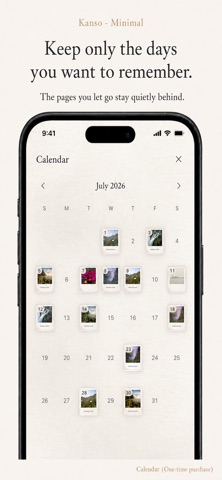
Just one a day. Kanso - Minimal places today's photo on a sheet of washi paper, lets you add a word, and then lets it go. It is not made for collecting photos. It is made for letting them go. - A DAY, IN FOUR STEPS 1. Take or choose Shoot right there, or pick a single photo from your library. 2. Compose Choose the shape (square, circle, rectangle), the paper, and the tone. Few choices, so there is little to hesitate over. 3. Write Add one line. With the keyboard, or by hand with your finger. Three pens - fountain, brush, pencil - and five inks. Write slowly and the line thickens; sweep quickly and it breaks into dry-brush marks. 4. Let go The card drifts away on the wind, and only empty space remains. - YOU DECIDE WHAT STAYS Before letting go, you can save the card as an image or share it. Do nothing, and nothing remains. - THE HOLDING PLACE Not sure yet? Set a card aside for later. Sort into Discard, Give, Sell, or Undecided, and decide another day. - iPAD AND APPLE PENCIL On iPad, a canvas lets you draw directly on the paper. Line width follows pressure, and quick strokes break into dry-brush marks. Once Apple Pencil is in use, finger touches are ignored, so you can rest your hand. Turn the device sideways and the card becomes a picture diary - photo on the left, words on the right. - KOYOMI - A ONE-TIME PURCHASE For the days you do want to keep. After you unlock it, every card you let go stays quietly in a calendar on your device. You can also choose a past date and fill in that day after the fact. It also lets you hide the date in the lower-right corner of a card, and adds four watercolor washi papers: Blossom, Mist, Leaf, and Wisteria. One payment, not monthly or yearly. Cards you let go before purchasing are not restored. - EVERYTHING STAYS ON YOUR DEVICE Your photos and your words are never sent anywhere. No account to create, and no analytics of any kind. Your original photos in the library are never modified. Japanese / English iPhone and iPad
Latest release
What’s New
Improvements to handwriting. • Tapping “Handwrite” above the keyboard now opens the full handwriting screen right away, with a slider for size. What you write is placed on the paper, where you can move and resize it freely. • You can now tap the paper to add a word anywhere before you finish your card.
Audience growth
Ratings growth
Baseline captured. Growth appears after the crawler observes a changed rating count.
Momentum comes from crawler snapshots for the tracked storefront. “Viral growth signal” means unusually fast recent rating gains; it is an indicator, not download data.
Price tracking
Price intelligence
First snapshot captured. The trend line starts after the next crawler price observation.
- First observed Aug 19, 2026 · 11:29 AM Free
Screenshots