About this app
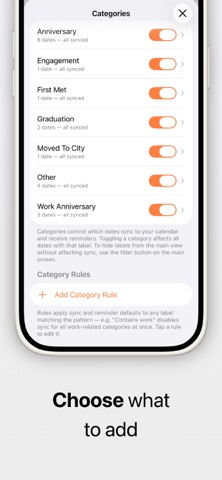
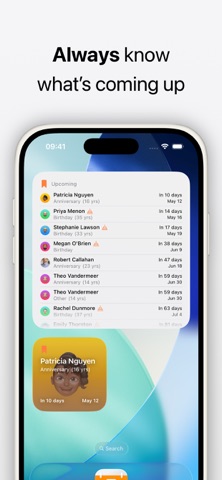
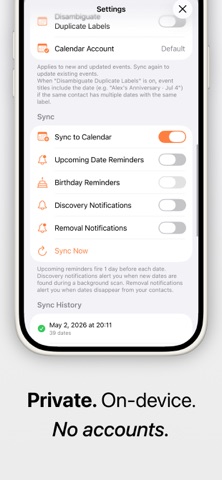
Your iPhone remembers birthdays. But important dates like anniversaries are easy to miss. KeepDates fixes that automatically. # What it does KeepDates finds dates stored in your contacts — anniversaries, custom events, and more — and turns them into reminders you’ll actually see. It works quietly in the background and keeps everything up to date as your contacts change. # Why it’s useful * Never forget anniversaries, milestones, or important personal dates * See all upcoming dates in one simple list * Get reminders before they happen * Works automatically — no manual setup # How it works * Scans your contacts for date fields * Lets you review and choose what to include * Syncs selected dates into a dedicated calendar * Keeps everything updated in the background # Key Features * Automatic contact date detection * Calendar sync with yearly recurring events * Optional reminders (day before by default) * Widgets for quick access to upcoming dates * Background sync — always up to date * Works completely offline # Widgets * Small widget — next upcoming date * Medium widget — multiple upcoming dates * Lock screen widget — quick glance countdown # Privacy KeepDates is built to be simple and private: * No accounts * No cloud sync * No tracking * All data stays on your device # Premium (Optional) Unlock additional control and customization: * Smart reminders (multiple timings) * More events in widgets + large widget * Look-ahead window control * Pinned contacts * Advanced filtering and customization ### KeepDates is designed to feel like a missing system feature — simple, automatic, and out of the way.
Latest release
What’s New
Birthdays can now sync to the KeepDates calendar. Sync Birthdays to Calendar: A new setting under Sync. Birthdays have always appeared in KeepDates for reference but stayed out of the calendar, since iOS publishes its own Birthdays calendar. Turn this on and they behave like every other date: an individual on/off switch each, included in "Sync All Dates", and your usual reminder timing. iOS still shows them in its own Birthdays calendar, so each birthday may appear twice unless you hide that one.
Audience growth
Ratings growth
Baseline captured. Growth appears after the crawler observes a changed rating count.
Momentum comes from crawler snapshots for the tracked storefront. “Viral growth signal” means unusually fast recent rating gains; it is an indicator, not download data.
Price tracking
Price intelligence
First snapshot captured. The trend line starts after the next crawler price observation.
- First observed Aug 24, 2026 · 11:06 PM Free
Screenshots