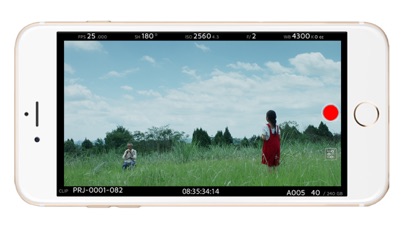
About this app
The new Kinefinity Connect App is capable of real time monitoring, setting camera parameters instantly and wirelessly when paired with MAVO Edge 8K/MAVO LF/MAVO/TERRA 4K (firmware KineOS6.5), and an external wireless AP. Naturally, it brings more involvement in field production and improves efficiency a lot. The cinema camera works as WIFI Client mode, so it needs an external wireless AP (access point), which could be smartphone hotspot (do not recommend iPhone 11 or below as hotspot/AP, but iPhone12 series or above are good for hotspot/AP) or wireless router, dual band preferred. The Kinefinity Connect App has three mode/pages: 1. Video mode: real-time video and key parameters; 2. Panel mode: key parameters only; 3. Setup mode: or menu/configuration mode. Input slate information and project information very easily. Note: the performance of camera may be affected if number of active links is over six at the same time.
Latest release
What’s New
Improved stability when connected to wireless router, and optimized the image quality in video mode.
Audience growth
Ratings growth
Baseline captured. Growth appears after the crawler observes a changed rating count.
Momentum comes from crawler snapshots for the tracked storefront. “Viral growth signal” means unusually fast recent rating gains; it is an indicator, not download data.
Price tracking
Price intelligence
First snapshot captured. The trend line starts after the next crawler price observation.
- First observed Sep 4, 2026 · 5:40 AM Free
Screenshots