About this app
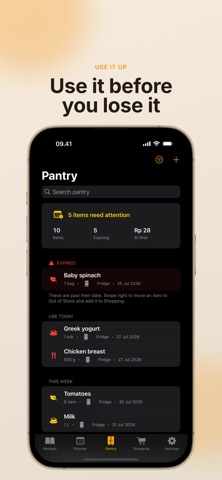
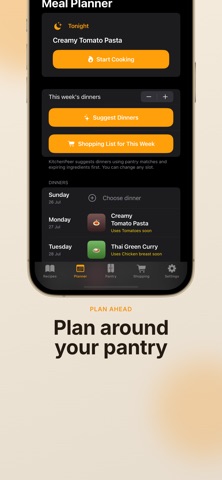
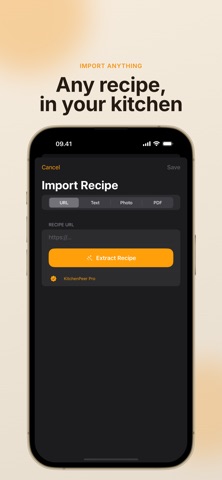
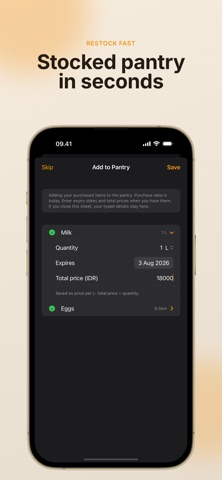
Cook from what you already bought. KitchenPeer is a local-first kitchen companion for people who save recipes, shop with good intentions, and still wonder what should be cooked before the fridge gives up on them. It connects your recipes, pantry, weekly dinners, shopping list, and cooking timers so dinner starts from reality: what you have, what is expiring, and what you actually want to cook. PLAN AROUND YOUR PANTRY Build a calm dinners-first meal plan instead of staring at a blank calendar. KitchenPeer can suggest this week’s dinners from your saved recipes, giving priority to pantry matches and ingredients that need to be used soon. Add a recipe to dinner, change any slot, then build a pantry-aware shopping list for the week. TRACK WHAT NEEDS ATTENTION Add pantry items with quantity, unit, location, category, purchase date, expiry date, and optional price. KitchenPeer groups food into Expired, Use Today, This Week, Soon, Later, and Out of Stock so the important items do not hide in a long list. If an item has no printed date, the app can suggest an estimated expiry from on-device storage-life rules for common foods like eggs, leafy greens, dairy, protein, grains, canned goods, and frozen items. SHOP ONLY THE GAPS Create shopping items manually or build a list from recipes. KitchenPeer can skip ingredients already matched in your pantry, combine compatible quantities, let you edit quantity and unit, check items off in the store, and move purchased items back into the pantry with expiry, unit, and total price. Out-of-stock pantry items can be sent back to Shopping for refill. IMPORT OR WRITE RECIPES Start with your own food, not a generic catalog. Paste recipe text for free, write recipes manually, add photos, organize categories, and edit ingredients, steps, servings, notes, source links, images, timers, and component groups such as Marinade or Sauce. Smart import can extract recipes from URLs, photos, and PDFs. COOK WITH LESS FRICTION Cooking Mode turns a saved recipe into focused steps with timers that stay visible. Timers can appear on the Lock Screen and Dynamic Island through Live Activities, and the in-app timer controls support pause, resume, cancel, and adjustments. When cooking ends, KitchenPeer can offer to reduce matched pantry quantities, using unit conversion so 200 g can be deducted from 1 kg. VOICE, WATCH, WIDGETS, AND SHARE Pro users can use hands-free voice commands on iPhone for cooking actions such as next step, repeat, start timer, pause, resume, and time remaining. Apple Watch includes a compact cooking flow with manual timer starts. Home Screen widgets show tonight’s dinner, cook-soon ideas, pantry expiry, and shopping count. A Share extension can import recipe URLs or text from other apps. LOCAL-FIRST AND PRIVATE KitchenPeer works offline for saved recipes, manual recipe creation, text parsing, pantry, planning, shopping, and cooking timers. Your free data is saved locally on your device. KitchenPeer only asks for Camera, Photos, Microphone, Speech, or Notifications when a feature needs them, and Settings explains how to manage permissions. PRO WHEN YOU WANT MORE KitchenPeer Pro unlocks smart URL/photo/PDF import after the free allowance, pantry receipt scanning, meal planner access, hands-free voice cooking, and private iCloud sync when available. iCloud sync uses Apple’s private CloudKit mirroring for your own devices; if iCloud is unavailable, the app falls back to local storage so you can keep cooking. WHY IT FEELS DIFFERENT KitchenPeer is built around the full home-cooking loop: save the recipe, know what is already in the kitchen, plan dinner around it, buy only what is missing, cook with visible timers, and update the pantry afterward. It is not trying to be another endless feed of recipes. It is a practical place for the food you already chose. Terms of Use (EULA): https://www.apple.com/legal/internet-services/itunes/dev/stdeula/
Latest release
What’s New
Free users can now use up to 5 Smart Imports or recipe scans every two weeks, with the allowance automatically resetting every two weeks. Existing users will also receive a fresh allowance after updating to this version. This update includes performance improvements and bug fixes.
Audience growth
Ratings growth
Baseline captured. Growth appears after the crawler observes a changed rating count.
Momentum comes from crawler snapshots for the tracked storefront. “Viral growth signal” means unusually fast recent rating gains; it is an indicator, not download data.
Price tracking
Price intelligence
First snapshot captured. The trend line starts after the next crawler price observation.
- First observed Aug 21, 2026 · 12:08 AM Free
Screenshots