About this app
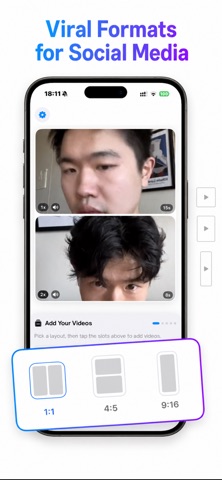
Layout for Video turns your clips into eye-catching video collages in seconds. Pick a grid, drop in your videos, and share a single video that plays them all together. Just like the collage apps you love for photos, but built for video. HOW IT WORKS 1. Choose one of 9 grid layouts 2. Add videos from your camera or library 3. Customize the canvas, background and playback 4. Save a crisp 1080p video to your photo library MADE FOR VIDEO * Record clips directly in the app or pick them from your library * Trim longer videos to the perfect moment with the built-in editor * Each clip can play up to 15 seconds * Preview everything live before you save 9 GRID LAYOUTS Side by side, stacked, three columns, three rows, classic 2x2 and more. Switch layouts anytime and your videos stay in place. CUSTOMIZE EVERYTHING * Canvas sizes for every feed: square 1:1, portrait 4:5 and story 9:16 * Background colors: pick from the palette or choose any custom color * Rounded corners in four styles, from sharp to soft * Playback speed per clip: slow motion 0.5x, normal or 2x * Mute individual clips to keep only the sound you want SMART ENDINGS Clips come in different lengths. Decide what happens when a shorter one ends: loop it from the start or fade its tile away while the rest keep playing. A live preview shows exactly how your video will behave. SHARE ANYWHERE Your finished collage is a standard video file saved straight to your photo library. Post it to any social app, send it in chats or keep it for yourself. FREE AND PREMIUM Start free with the essential layouts and two video exports. Upgrade to Premium for all 9 layouts, every canvas size, custom backgrounds, speed controls and unlimited videos. Premium is available as an auto-renewable subscription. Payment is charged to your Apple Account and the subscription renews automatically unless cancelled at least 24 hours before the end of the period. Manage or cancel anytime in your Apple Account settings. Privacy Policy: https://docs.google.com/document/d/1kPrkcst66FQfowPhhgX5rozF8y1KNkxybdhcnvVqI88/edit?usp=sharing Terms of Use: https://docs.google.com/document/d/1WRCHhBdpVvzbi0C0kJ3iyti18roFEdnNYzvOG0Nr3RI/edit?usp=sharing
Audience growth
Ratings growth
Baseline captured. Growth appears after the crawler observes a changed rating count.
Momentum comes from crawler snapshots for the tracked storefront. “Viral growth signal” means unusually fast recent rating gains; it is an indicator, not download data.
Price tracking
Price intelligence
First snapshot captured. The trend line starts after the next crawler price observation.
- First observed Aug 13, 2026 · 4:45 AM Free
Screenshots