About this app
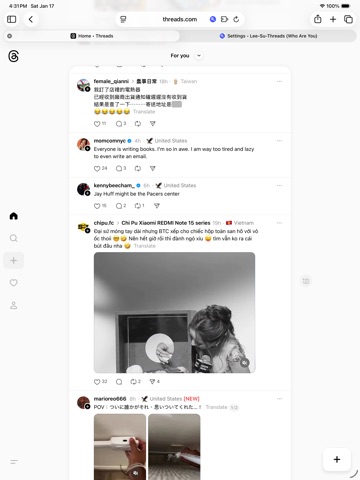
Lee-Su-Sui: See Where Everyone's From on Threads Tired of clicking into every profile to see where someone is from? Lee-Su-Sui automatically displays location badges right on the Threads feed, so you can instantly see where post authors are located. KEY FEATURES Automatic Location Display • Location badges appear automatically as you scroll • No need to visit each profile manually • Works on posts, comments, and follower lists Smart Location Stats • See which countries/cities appear most in your feed • Track location trends over time • Discover your global connections Customizable Emojis • Customize flag emojis for any location • Beautiful country flag display • Full emoji picker with search Fast & Private • All data cached locally on your device • No external servers or tracking • Lightweight and performance-optimized Multi-Language Support • Available in English, Traditional Chinese, Simplified Chinese, Japanese, and Korean • Localized for global users HOW IT WORKS 1. Install the Safari extension 2. Visit threads.com in Safari 3. Location badges appear automatically as you scroll 4. Click any badge to see detailed location stats SAFARI EXTENSION DETAILS This is a Safari web extension that runs on threads.com to enhance your browsing experience. The extension: • Only accesses threads.com (no other websites) • Reads publicly available profile information (location, join date) • Stores all data locally on your device • Does not send data to external servers • Does not interfere with Safari or system functionality Privacy-first design: All processing happens locally in your browser. Your data never leaves your device. REQUIREMENTS • iOS 15.0 or later • Safari browser • Threads account (to view content) SUPPORT Open source and community-driven. Visit our GitHub repository for support, feature requests, and contributions. --- Note: This is an unofficial extension and is not affiliated with Meta or Threads.
Latest release
What’s New
- Fixed the toolbar icon showing a white box behind it in dark mode - Adjusted the toolbar icon size so it matches the other icons in your browser toolbar
Audience growth
Ratings growth
Baseline captured. Growth appears after the crawler observes a changed rating count.
Momentum comes from crawler snapshots for the tracked storefront. “Viral growth signal” means unusually fast recent rating gains; it is an indicator, not download data.
Price tracking
Price intelligence
First snapshot captured. The trend line starts after the next crawler price observation.
- First observed Aug 16, 2026 · 1:41 PM Free
Screenshots