About this app
LiftTracker is a dead-simple lift tracker. Log your sets with a tap, and the app handles the math: add weight when you succeed, deload after three straight fails. FEATURES • 5×5 auto-progression — weight goes up on success, deloads 10% after 3 failed sessions • Tap-to-log rep circles, no fiddly keyboards • Live Activity rest timer on your Lock Screen and Dynamic Island • History calendar of every workout • Progress charts per exercise • Pounds or kilograms No accounts. No ads. No cloud. Your data stays on your phone.
Latest release
What’s New
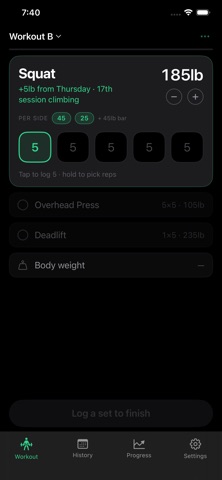
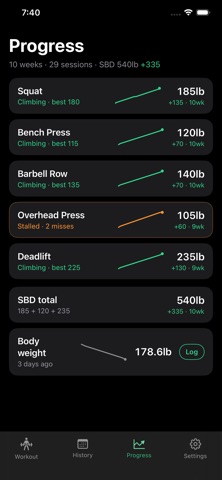
Every screen rebuilt around one question: what is the app doing to my weights, and why? THE WORKOUT SCREEN • One lift is open at a time, with the next set ringed. Finished lifts collapse above it, upcoming ones wait below • Tap a set to log five. Hold it to pick a different number — no more tapping five times to get to four • Undo takes back a mis-tap instead of making you cycle past it • Plate math shows what to hang on each side, using the plates you own • Skip a lift on purpose, or discard a session you never should have started — and the app says plainly that discarding changes no weights PROGRESSION, OUT LOUD • The workout card, the summary screen and Settings all state what happens next: what goes up, what holds, what deloads, and how many misses are left • The end-of-session screen reports what changed and why, per lift REST • Counts down instead of up, and each lift gets its own rest length (or none) • Lock Screen timer gains +30s and Log Set buttons — the phone stays in your pocket HISTORY AND PROGRESS • Five weeks at a glance, then session cards, then set-by-set detail • Charts step between weights instead of drawing curves through weights you never lifted • Body weight can be logged any day, not only alongside a workout • Deleting a session can be undone ALSO • A first-run screen that explains the program in four sentences • Fixed: editing a weight by hand no longer carries old misses toward a deload
Audience growth
Ratings growth
Baseline captured. Growth appears after the crawler observes a changed rating count.
Momentum comes from crawler snapshots for the tracked storefront. “Viral growth signal” means unusually fast recent rating gains; it is an indicator, not download data.
Price tracking
Price intelligence
First snapshot captured. The trend line starts after the next crawler price observation.
- First observed Sep 8, 2026 · 12:35 AM Free
Screenshots