About this app
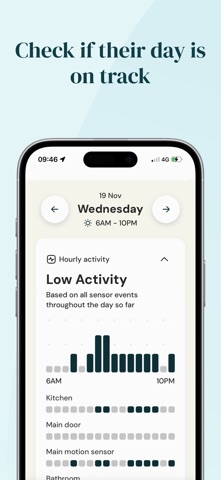
Welcome to the Lilli app for family and friends. Lilli helps you to monitor and understand the health and care needs of your loved one. Lilli uses discreet, non-intrusive sensors (no cameras or wearables) placed in key locations around the home. Once the Lilli kit is set up, the app helps you stay connected to your loved one’s routines, offering gentle reassurance and peace of mind even when you can’t be there in person. Live reassurance Get peace of mind that your loved one is comfortable and safe through live updates. Check the app to see their latest activity, the current home temperature and whether they’re at home or out and about. Check that their day is on track Kitchen activity, front door usage, bathroom visits, and overall activity levels are displayed in a visual way, helping to build a story of their day. Over time, you can learn about their typical routines and check whether their day is unfolding as expected. See how their night went Keep an eye on whether they’re sleeping well through the night. Checking their wake-up time each day can tell you whether their morning has gotten off to a good start. Spot periods of inactivity Easily notice and respond to any unexpected periods of inactivity. Look back up to a week Go back over the past week to see how their days and nights have unfolded Share insights with family and anyone in the care circle Use the share button if something is worth sharing with others in the care circle. Simple set up The Lilli kit comes in a compact box with everything you need to set it up. Following instructions in the app, the set up is quick and doesn’t require any tools.
Latest release
What’s New
- Adds a trends tab to better see how residents are coping over time. - Updates the install flow to accommodate variable sensor environments. - Allows user to update the sensor locations post-install - Updates the date picker for quicker navigation
Audience growth
Ratings growth
Baseline captured. Growth appears after the crawler observes a changed rating count.
Momentum comes from crawler snapshots for the tracked storefront. “Viral growth signal” means unusually fast recent rating gains; it is an indicator, not download data.
Price tracking
Price intelligence
First snapshot captured. The trend line starts after the next crawler price observation.
- First observed Aug 23, 2026 · 6:09 AM Free
Screenshots