About this app
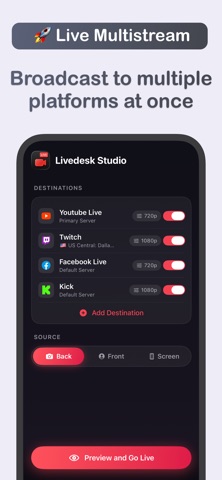
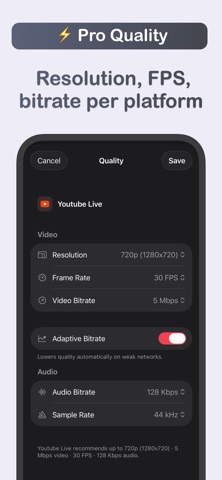
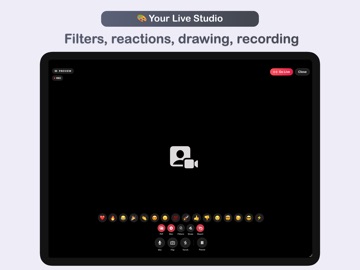
• Available on all your devices: macOS, iPadOS, and iOS • Livedesk Studio turns your iPhone and iPad into a full live broadcasting studio. Go live on any streaming platform like YouTube, Facebook, Twitch, Kick, or any custom RTMP/RTMPS server, and broadcast to several platforms at the same time. Whether it's an event, a concert, your gameplay, a Q&A, a product announcement, or a web tutorial, Livedesk gets you on air in seconds, right from your pocket. WHAT CAN YOU BROADCAST • Your camera (front or back) and microphone • Your device screen: everything on it, even other apps, using screen broadcasting MULTISTREAM EVERYWHERE AT ONCE • Go live to any number of destinations at the same time • Each destination has its own platform, server, stream key, and quality • See per-destination status while you're live, so you always know who's receiving your stream KEY FEATURES • Multistream to YouTube, Facebook, Twitch, Kick, and any custom RTMP/RTMPS platform, several destinations at once • Broadcast your camera and mic, or your whole screen (even other apps) • Dual-camera Picture-in-Picture: show your front and back cameras together (on supported devices) • Live effects: cinematic filter looks baked right into your broadcast • Reactions: send emoji bursts that appear in your stream • Live drawing: draw and add shapes, text, and photos over your broadcast, then move, resize, and rotate them freely • Record your broadcast locally, in full quality, straight to your Photos library • Camera controls: pinch to zoom, flip camera, torch, and mute • Built for reliability: automatic reconnect if the connection drops, adaptive bitrate that adjusts to your network, plus battery and temperature indicators • Fine-tune quality per destination: resolution, frame rate, and video/audio bitrate • Designed for iPhone and iPad. Just open it, add a destination, and you're live! SUPPORT We read your support emails every day, day by day. Write with confidence any question, feedback, or complaint, and you will receive an answer in a very short period of time. We offer two auto-renewing subscriptions and a one-time payment option: • Monthly subscription • Annual subscription, starts with a free trial • Lifetime access: one-time payment only Prices may vary by location. Subscriptions will auto-renew unless canceled. • Payment will be charged to your Apple Account at confirmation of purchase • Subscription may be managed by the user, and auto-renewal may be turned off by going to the user's Account Settings after purchase. • No cancellation of the current subscription is allowed during the active subscription period. • Subscription automatically renews unless auto-renewal is turned off at least 24-hours before the end of the current period. • Your account will be charged for renewal for the amount of your current subscription within 24-hours prior to the end of the current period. All costs for subscriptions are mentioned above. Privacy Policy https://alexdenk.eu/subscriptions-privacy-policy.html Terms of Use https://alexdenk.eu/subscriptions-terms-of-use.html
Latest release
What’s New
• Bug fixes, improvements and new features
Audience growth
Ratings growth
Baseline captured. Growth appears after the crawler observes a changed rating count.
Momentum comes from crawler snapshots for the tracked storefront. “Viral growth signal” means unusually fast recent rating gains; it is an indicator, not download data.
Price tracking
Price intelligence
First snapshot captured. The trend line starts after the next crawler price observation.
- First observed Aug 7, 2026 · 11:25 PM Free
Screenshots