About this app
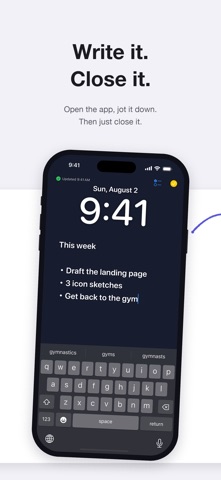
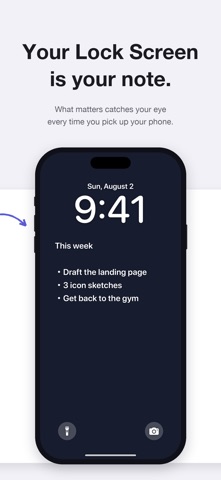
LockBoard keeps your notes on your Lock Screen wallpaper — always visible, zero effort. The fundamental weakness of to-do apps: they only work if you open them. LockBoard turns your note itself into your wallpaper, so it catches your eye every time you pick up your phone. Like a sticky note on the fridge, it works without you even trying — on the screen you look at more than any other. ■ Just write and close - Open → write → close. That's all - The wallpaper image refreshes automatically the moment you close the app - One board only. No lists to manage, nothing to organize ■ What you see is what you get - The preview shows exactly what your Lock Screen will look like - Backgrounds: 6 calm solid colors, 6 gradients, or a photo you love - Adjust text size, vertical position, and a readability backdrop - The layout stays clear of the Lock Screen clock and bottom buttons ■ How it works (one-time setup, about a minute) iOS doesn't let apps change your wallpaper directly. LockBoard pairs with a Shortcuts automation that updates the wallpaper automatically whenever you close the app. Just follow the in-app guide: adding the shortcut takes one tap, and the whole setup is about a minute. After that, no extra steps — ever. ■ Great for - Keeping this week's goals in sight without relying on willpower - Anyone who could never stick with a to-do app - Shopping and packing lists you can check at a glance - Words you live by, always in view - Drilling facts for exams and certifications ■ Privacy - Your notes and photos never leave your device - No personally identifiable data is collected (only anonymous usage stats) - No account required
Latest release
What’s New
- 6 new gradient backgrounds to choose from - Quadrant layout: adjust how the screen is split by dragging the dividers - Added an easy way to rate the app and send feedback - Stuck on setup? You can now open the illustrated step-by-step guide from inside the app - We now point you to the iPhone setting that keeps your note truly always visible (on devices with an always-on display, turn on Always On Display and turn off Blur Wallpaper Photo, and your note stays on screen even after you press the side button) - New Lock Screen widget: place "Open LockBoard" under the clock and jump into your memo in one tap (long-press the Lock Screen → Customize → Add Widgets) - "Open LockBoard" can also be assigned to Control Center, the Lock Screen bottom buttons, or the Action button (iOS 18 and later) - Your board is now backed up automatically every time you close the app. If you ever delete something by mistake, restore it anytime from Backups in the settings menu - If the saved data ever fails to load, LockBoard now recovers from the latest backup automatically - New shortcut action "Append to Board": add to your memo without opening the app — from Siri, the Action button, or the share sheet (chain it with "Get Note Wallpaper" → "Set Wallpaper" to update your Lock Screen automatically) - The settings menu now stays available while you type, so you can change the background or style and keep writing - New Smart Placement option for "Append to Board": on-device AI picks the best column and adds a checkbox when it fits (on supported devices — your notes never leave your device)
Audience growth
Ratings growth
Baseline captured. Growth appears after the crawler observes a changed rating count.
Momentum comes from crawler snapshots for the tracked storefront. “Viral growth signal” means unusually fast recent rating gains; it is an indicator, not download data.
Price tracking
Price intelligence
First snapshot captured. The trend line starts after the next crawler price observation.
- First observed Aug 20, 2026 · 12:21 AM Free
Screenshots