About this app
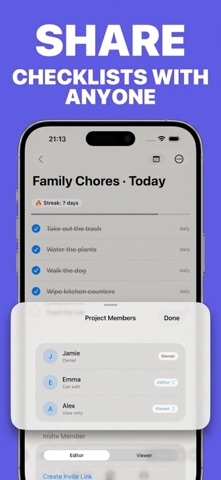
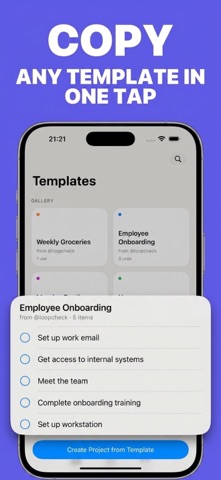
Loopcheck turns checklists into something that resets itself instead of piling up forever. Every item comes back on its own schedule — daily, weekdays, or custom days — so you start each morning with a clean list. RECURRING TASKS, NOT ONE-OFF TO-DOS Set a schedule once — daily, weekdays, weekends, or specific days — and the item reappears automatically. No re-adding the same chores every single day. SHARED PROJECTS FOR FAMILY AND TEAMS Create shared projects — Home, Work, Groceries — and invite the people you share them with. Owner, editor, and viewer roles control who can change the list and who just tracks progress. Everything syncs in real time. STREAKS THAT KEEP YOU GOING Finish every item in a project, day after day, and watch your streak grow. The project calendar shows your history at a glance — fully done days, partial days, and what's still ahead. READY-MADE TEMPLATES Don't want to start from a blank list? The template gallery offers ready-made sets for home, work, and study — in English and Russian. Save your own projects as templates to reuse them later. DESIGNED FOR iOS Loopcheck is built with the new Liquid Glass design language — translucent surfaces, fluid animation, full dark mode support — so it feels like a natural part of the system. PRO SUBSCRIPTION The free version covers basic projects and checklists. Loopcheck Pro removes the limits on projects and collaborators and unlocks full completion history, with weekly, monthly, or lifetime plans. Loopcheck is for anyone who wants the important stuff to come back on its own — not get buried in last month's list. Privacy Policy: https://sites.google.com/view/loopcheckprivacy/ Terms of Use (EULA): https://www.apple.com/legal/internet-services/itunes/dev/stdeula/
Latest release
What’s New
Fixed: • Error when accepting a project invite • Push notifications not being delivered • Participant names not showing in shared projects • Collaboration access check occasionally behaving incorrectly Added: • Ability to name your own project — from scratch or from a template
Audience growth
Ratings growth
Baseline captured. Growth appears after the crawler observes a changed rating count.
Momentum comes from crawler snapshots for the tracked storefront. “Viral growth signal” means unusually fast recent rating gains; it is an indicator, not download data.
Price tracking
Price intelligence
First snapshot captured. The trend line starts after the next crawler price observation.
- First observed Aug 21, 2026 · 1:56 AM Free
Screenshots