About this app
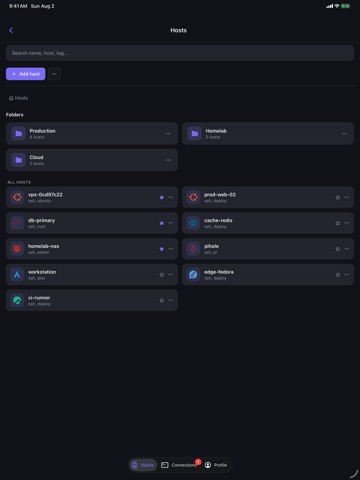
Luma is a lightweight SSH and SFTP client designed for managing remote systems from your iPhone or iPad. Connect to servers through a responsive mobile terminal, organize frequently used hosts, securely manage credentials, and transfer files without switching between multiple apps. FEATURES • Secure SSH terminal sessions • Saved hosts with groups, favorites, tags, and search • Quick Connect for one-time connections • SFTP file browsing, uploads, and downloads • Create, rename, and remove remote files and folders • Reusable command snippets with customizable variables • Encrypted storage for private keys and passphrases • Host-key verification and changed-key warnings • Automatic reconnection for interrupted sessions • Optional end-to-end encrypted configuration sync • Encrypted backup and restore • Light and dark appearance options YOUR DATA, YOUR CONTROL Luma does not require a Luma account or a paid cloud service. Sensitive credentials are encrypted on your device. Optional synchronization is end-to-end encrypted before your configuration leaves the device. Whether you maintain a home server, administer remote infrastructure, or need terminal access while away from your computer, Luma keeps your essential SSH tools close at hand. Luma is open-source software.
Latest release
What’s New
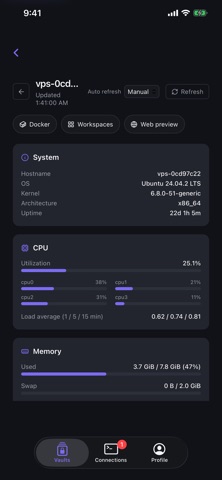
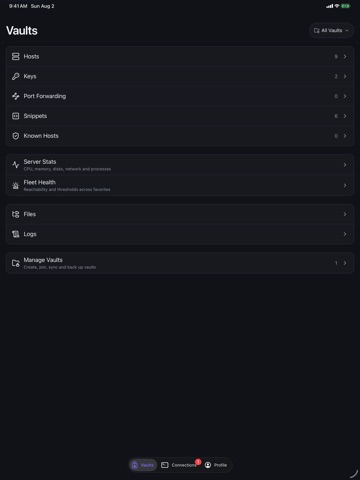
Luma on iPhone and iPad grows up in this release — server monitoring, collaboration, tunnels, and a terminal that finally feels native to touch. NEW • Live Activities — keep an eye on SSH connections and file transfers from the Lock Screen and Dynamic Island while you're in another app. • Server dashboard — pick any saved host and see CPU, memory, disk, network, processes, and uptime live over SSH. Nothing to install on the server. • Agent Inbox — check on coding agents running in your sessions from your phone, newest first; tap through to the terminal that needs you. • Shared terminals — join a collaborative session from a luma:// link and watch or take control from mobile. • Port forwarding — create and manage SSH tunnels on the go. • Vaults on mobile — full vault management, sharing, and sync configuration. • SFTP host-to-host copy — move a file straight from one connected server to another without routing it through your device. • Voice dictation — speak a command into the terminal, with optional auto-send. TERMINAL • Keyboard accessory bar with Esc, Tab, arrows, and the punctuation the iOS keyboard hides. • Touch gestures: long-press and drag for arrow keys, double-tap for Tab. Both can be turned off in Settings. • Rewritten terminal rendering and font setup for sharper, more consistent text across devices. • Auto-reconnect for SSH sessions that drop when you switch apps or networks. • Live session previews on the Connections tab. REFINEMENTS • Native iOS tab bar and system light/dark appearance throughout. • Redesigned, grouped host editor. • Long-press context menus for sessions and SFTP entries. • Website, GitHub, Discord, and issue links in Settings. PRIVACY • Optional anonymous analytics — off unless you turn it on, with a clear first-run choice and a toggle in Settings. FIXES • Fixed the vault switcher dropdown not opening. • Assorted stability and build fixes.
Audience growth
Ratings growth
Baseline captured. Growth appears after the crawler observes a changed rating count.
Momentum comes from crawler snapshots for the tracked storefront. “Viral growth signal” means unusually fast recent rating gains; it is an indicator, not download data.
Price tracking
Price intelligence
First snapshot captured. The trend line starts after the next crawler price observation.
- First observed Aug 24, 2026 · 8:53 AM Free
Screenshots