About this app
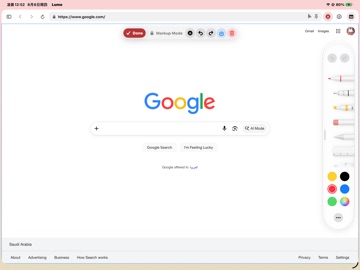
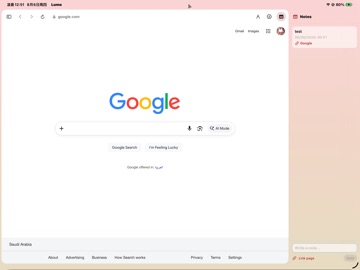
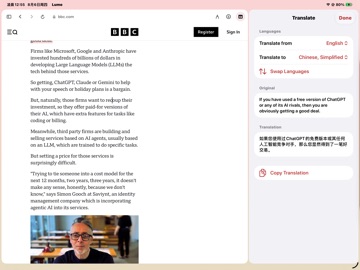
Lumo is a browser built for a large screen, a keyboard and a trackpad. Pages load as their full desktop versions — you get the whole site, not a phone layout squeezed sideways. DESKTOP-CLASS BROWSING · Sites load under a desktop identity by default: wide layouts, complete features · Right-click menus, link hover, Command-click to open in a background tab · Trackpad and mouse scrolling ride the system's own path, as smooth as a finger · Per-site settings for zoom, appearance, fonts, camera and microphone — remembered for each site individually SPACES · Each space owns its tabs and pinned sites, so work and everything else stay apart · Leaving a space puts its pages to sleep down to a title and a scroll position — no memory, no battery · Coming back finds the page you left, still there PINNED SITES · The sites you open every day sit in a grid, one tap away · Rename any of them; you are not stuck with whatever the page calls itself AD AND TRACKER BLOCKING · Engine-level rules stop requests before they download, so pages load faster and lighter · Third-party requests only — a site's own features are never touched, so sign-ins keep working · One switch turns it off, and any single site can be allowed on its own NOTES · A notes panel beside the page: write something down without leaving what you are reading · Notes are kept indefinitely and sync to your other devices TRANSLATION · Select text, right-click, translate — the result opens in a side panel · Translating inside a text field offers to replace the original PASSWORDS · Saved passwords live in the system's secure storage and fill in after you unlock · Backups are encrypted with a passphrase only you know ALSO · Read and import PDFs · Download manager · Your own background image, with adjustable blur so text stays readable · Light and dark following the system LUMO PRO (one-time purchase, not a subscription) · Two Page Workspace: two websites side by side, both live, the address bar following whichever you click · Page markup: draw and write on any page by hand, and keep what you marked · Professional Web Toolkit: pull out images, links and tables; inspect resources and storage; export the whole page as a PDF or one long image; keep custom CSS and scripts for a single site · A companion and break reminders, for when you have been reading too long · Daylight and a daily line: the tint drifts through the hours, and one line changes each day Browsing history stays on your device. It is never uploaded.
Latest release
What’s New
Lumo can now run scripts you install yourself. USER SCRIPTS · Standard .user.js scripts, added from a link, a file on your iPad, or pasted source · Nothing comes preinstalled — what runs is your decision · A mark appears in the address bar when a page has scripts on it · Press it to see which ones, or to switch them off for this site alone · A script's settings stay on this device and survive updating it · Part of Lumo Pro KEYBOARD SHORTCUTS · Every shortcut is listed in Settings, and can be changed to whatever you already have in your hands · What the menu shows and what the page responds to are now the same thing · Combinations a website needs for itself are refused, so you cannot take one by accident AVATAR ORNAMENTS · Seven to choose from, in your profile · Part of Lumo Pro ALSO · A short opening on the first launch and after an update, and nowhere else · The Lumo Pro page has new descriptions and new icons · The profile card is redrawn · Various stability improvements
Audience growth
Ratings growth
Baseline captured. Growth appears after the crawler observes a changed rating count.
Momentum comes from crawler snapshots for the tracked storefront. “Viral growth signal” means unusually fast recent rating gains; it is an indicator, not download data.
Price tracking
Price intelligence
First snapshot captured. The trend line starts after the next crawler price observation.
- First observed Aug 19, 2026 · 8:39 AM Free
Screenshots